


Gaming on the PlayStation 5 (PS5) is an exhilarating experience, thanks to its powerful hardware and stunning graphics. However, one aspect that can affect your gaming performance and enjoyment is input lag. If you’ve ever felt like there’s a delay between pressing a button on your controller and seeing the corresponding action on the screen, you’re likely dealing with input lag. In this guide, we’ll delve into what input lag is, its causes, and effective strategies to reduce it and optimize your gaming experience.
What Is Input Lag?
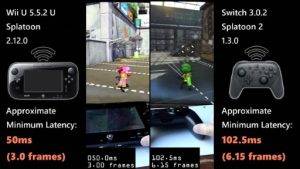
Input lag refers to the delay between the moment you input a command via your controller (e.g., pressing a button or moving a joystick) and the time when the action is reflected on the screen. In the world of gaming, especially in competitive or fast-paced games, even the slightest input lag can be frustrating and put you at a disadvantage.
Common Causes of Input Lag

Understanding the causes of input lag is the first step in addressing the issue. Here are some common factors that contribute to input lag:
- Display Technology: Different display technologies, such as LCD, OLED, or LED, can exhibit varying levels of input lag. Older TVs, in particular, may have higher input lag compared to newer models.
- Connection Type: The type of connection between your console and your display can affect input lag. HDMI cables, for example, have different versions, and using an outdated cable may result in higher input lag.
- Gaming Mode: Many modern TVs have a gaming mode or low-latency mode. If this mode is not enabled, it can lead to increased input lag.
- Controller Responsiveness: The responsiveness of your controller, whether it’s a wired or wireless connection, can influence input lag.
- Network Latency: When playing online multiplayer games, your internet connection’s latency can introduce input lag if it’s not stable or fast enough.
Reducing Input Lag
Now that you’re aware of the potential causes, let’s explore strategies to reduce input lag:
- Enable Gaming Mode:
- If your TV has a gaming mode or low-latency mode, enable it. This mode optimizes the display settings for gaming, reducing input lag.
- Use a Wired Connection:
- If possible, connect your controller to the PS5 using a wired USB connection. Wired connections generally have lower input lag compared to wireless ones.
- Update Firmware:
- Keep your console and display’s firmware up to date. Manufacturers often release updates that improve performance, including input lag reduction.
- Optimize Network:
- For online gaming, ensure a stable and fast internet connection. Use a wired Ethernet connection if available, or optimize your Wi-Fi network to minimize latency.
- Choose a Gaming Monitor or TV:
- Gaming monitors and TVs designed specifically for gaming tend to have lower input lag. Look for models with a low response time and minimal input lag.
Also Read: TV Keeps Turning Off Every 5 Seconds: Troubleshooting and Solutions
Gaming Monitors and TVs
When it comes to minimizing input lag, choosing the right gaming monitor or TV is crucial. Look for these features when shopping for a display:
- Low Response Time: Displays with low response times (measured in milliseconds, or ms) can reduce motion blur and input lag.
- High Refresh Rate: Monitors and TVs with higher refresh rates, such as 120Hz or 144Hz, can provide smoother gameplay and lower input lag.
- Variable Refresh Rate (VRR): VRR technologies like FreeSync and G-Sync help synchronize the display’s refresh rate with your console’s frame rate, reducing input lag and screen tearing.
- Input Lag Reduction Features: Some displays have dedicated modes or settings to reduce input lag further. Check for these options in the display’s settings menu.
Input lag can be a frustrating hurdle for gamers, but with the right knowledge and adjustments, you can significantly reduce its impact on your gaming experience. By enabling gaming modes, using wired connections, keeping your firmware up to date, optimizing your network, and choosing a gaming monitor or TV with low input lag, you’ll be well on your way to enjoying a smoother, more responsive gaming experience on your PS5. Remember that every millisecond counts in competitive gaming, so fine-tuning your setup can make a world of difference.