


Apple’s AirTag is a cutting-edge device designed to help you keep track of your belongings with ease. A common question among users is, “Can multiple people track an AirTag?” This comprehensive guide will delve into this query, discuss related topics, and provide a thorough understanding of how AirTag works in multi-user scenarios.
Understanding AirTag Functionality
What is an AirTag?
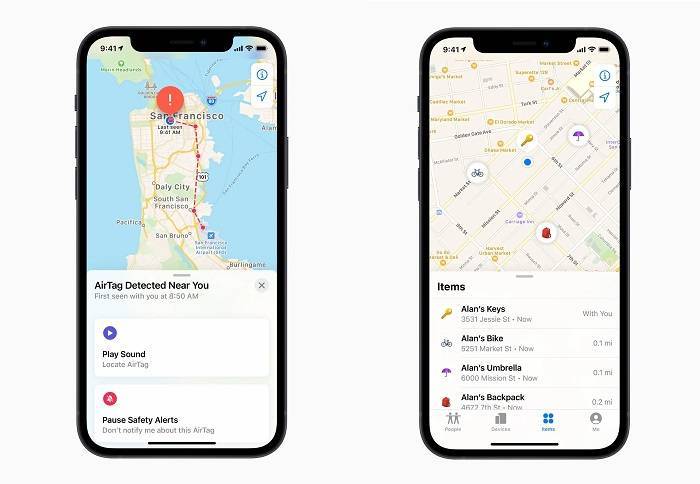
An AirTag is a small, circular tracking device created by Apple. It is designed to be attached to personal items like keys, wallets, and bags, allowing users to locate these items using the Find My app on their iPhone, iPad, or Mac.
How Does AirTag Work?
AirTag uses Bluetooth technology to communicate with nearby Apple devices in the Find My network. When an AirTag is out of range of the owner’s device, it sends a secure Bluetooth signal that nearby devices in the Find My network can detect. These devices relay the AirTag’s location to the owner, all without compromising privacy.
Can Multiple People Track an AirTag?
Official Apple Policy
According to Apple’s official policy, an AirTag can only be associated with one Apple ID at a time. This means that only the owner who set up the AirTag with their Apple ID can track it.
Workarounds and Limitations
Although an AirTag is tied to a single Apple ID, there are some workarounds that can allow multiple people to be involved in tracking it:
- Sharing Apple ID Credentials: One way to let multiple people track an AirTag is by sharing the Apple ID credentials used to set up the AirTag. However, this method is not recommended due to privacy and security concerns.
- Family Sharing: While Family Sharing allows family members to share Apple services, it does not extend to sharing AirTag tracking. Each AirTag remains linked to its original Apple ID.
Practical Implications
Since an AirTag is designed to be linked to a single Apple ID, only one person can actively track it. This limitation ensures that the privacy and security of the AirTag owner are maintained.
Alternative Tracking Solutions
Tile Trackers
Unlike AirTag, Tile trackers can be shared among multiple users. The Tile app allows you to share your Tile with friends and family, giving them access to its location.
Samsung Galaxy SmartTag
Samsung Galaxy SmartTag also supports multi-user access through Samsung’s SmartThings app. Users can share their SmartTags with trusted individuals within the SmartThings ecosystem.
Chipolo One
Chipolo One offers similar sharing capabilities to Tile, allowing multiple users to track the same Chipolo device through the Chipolo app.
Comparison Table
| Feature | Apple AirTag | Tile Trackers | Samsung Galaxy SmartTag | Chipolo One |
| Multi-User Tracking | No | Yes | Yes | Yes |
| Bluetooth Tracking | Yes | Yes | Yes | Yes |
| Find My Network | Yes | No | No | No |
| Precision Finding | Yes | No | Yes | No |
| Privacy and Security | End-to-End Encryption | Basic | Advanced | Basic |
| Lost Mode | Yes | Yes | Yes | Yes |
Privacy and Security Considerations
End-to-End Encryption
AirTags use end-to-end encryption to ensure that your location data is secure. The location data and history are never stored on the AirTag itself, and only the owner can see where the AirTag is located.
Anti-Stalking Measures
Apple has implemented measures to prevent AirTags from being used to track individuals without their consent. If an unknown AirTag is detected moving with you, your iPhone will alert you, ensuring that AirTags cannot be used to track people without their knowledge.
Practical Uses of AirTag
Tracking Personal Belongings
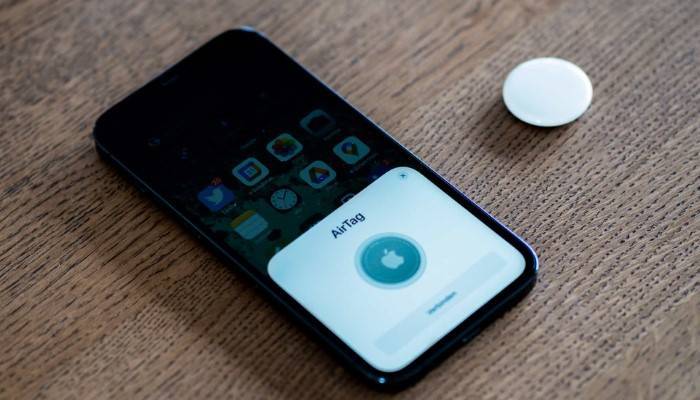
AirTags can be attached to items such as keys, wallets, and bags to help you locate them quickly and easily using the Find My app.
Traveling
When traveling, attaching an AirTag to your luggage can provide peace of mind, knowing that you can track your bags if they get lost.
Pet Tracking
While AirTags are not specifically designed for pets, many users attach them to pet collars to keep track of their furry friends. However, for real-time tracking and multi-user access, specialized pet trackers might be more suitable.
Vehicle Tracking
Attaching an AirTag to your car keys or placing one inside your vehicle can help you locate it in a large parking lot or if it gets stolen.
Enhancing AirTag Usage
Regularly Check Battery Status
Monitor the battery status of your AirTags through the Find My app and replace them promptly when needed to ensure continuous tracking.
Customize AirTag Names
Customize the names of your AirTags to reflect the items they are attached to, making it easier to manage multiple AirTags in the Find My app.
Use Protective Accessories
Consider using protective accessories such as keychain holders or waterproof cases to enhance the durability and longevity of your AirTags. These accessories provide an extra layer of protection against water and physical damage.
Avoid Extreme Conditions
Avoid exposing your AirTags to extreme temperatures or harsh conditions to prevent damage and ensure they continue to function effectively. Keep them away from water and dust as much as possible.
Frequently Asked Questions
Can multiple people track an AirTag simultaneously?
No, an AirTag can only be associated with one Apple ID at a time, meaning only the owner can track it.
Is it possible to share an AirTag with family members?
While you cannot share an AirTag directly, family members can use the owner’s Apple ID to track the AirTag, though this is not recommended for privacy and security reasons.
What alternatives are there for multi-user tracking?
Tile, Samsung Galaxy SmartTag, and Chipolo One all offer multi-user tracking capabilities, allowing you to share the device’s location with trusted individuals.
How do AirTags protect my privacy?
AirTags use end-to-end encryption, ensuring that your location data is secure. Additionally, Apple has anti-stalking measures to alert users if an unknown AirTag is detected moving with them.
What should I do if I find an AirTag that is not mine?
If you find an AirTag that is not yours, you can use any NFC-capable smartphone to read the tag and find out if it is in Lost Mode, providing information to contact the owner.
Related Post:
AirTag Won’t Connect: Troubleshooting and Solutions
Find AirTag: The Ultimate Guide to Locating Your Apple AirTag
AirTag Lost Mode: A Comprehensive Guide to Locating Your Items
Samsung AirTag: A Comprehensive Guide to Smart Tracking
While the question “can multiple people track an AirTag” has a straightforward answer—no, due to the single Apple ID association—there are workarounds and alternative devices that support multi-user tracking. Understanding the limitations and capabilities of AirTags, along with exploring alternative solutions, ensures you can choose the best tracking device for your needs. By following the tips and information provided in this guide, you can maximize the functionality and security of your AirTag.