

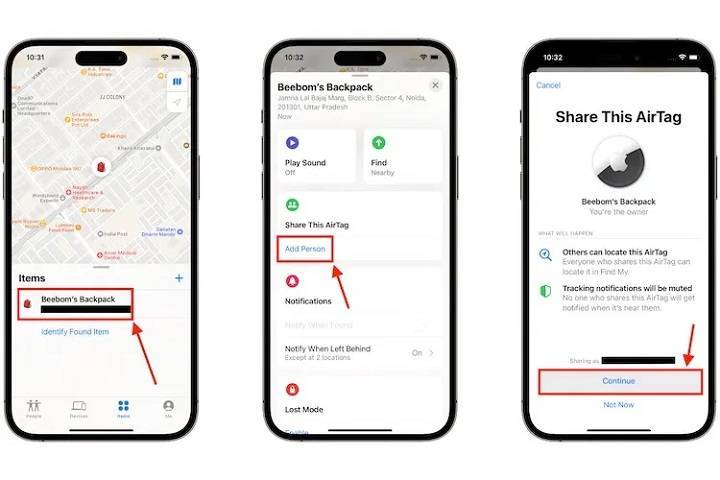
Apple’s AirTag is a powerful tool for keeping track of your personal items. One of the most common questions users ask is, “can you share AirTag location?” This comprehensive guide will delve into this topic and explore various related aspects of AirTag functionality, sharing options, and best practices. We’ll provide in-depth information and tips to help you maximize the use of your AirTag.
Understanding AirTag Location Sharing
What is an AirTag?
An AirTag is a small, circular tracking device developed by Apple to help you locate personal items such as keys, wallets, bags, and more. By attaching an AirTag to your items, you can easily find them using the Find My app on your iPhone or other Apple devices.
Can You Share AirTag Location?
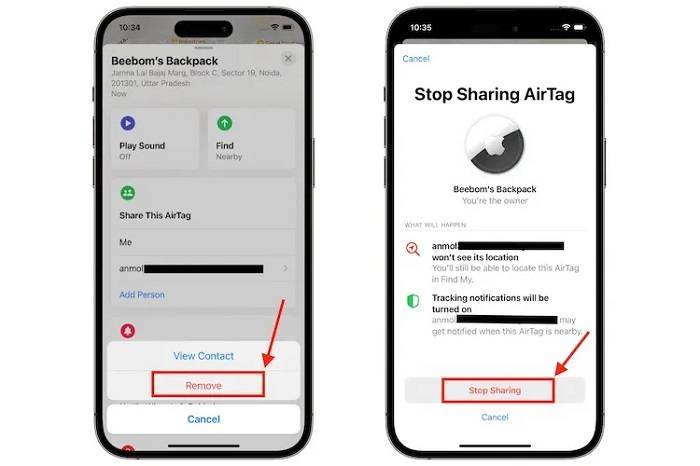
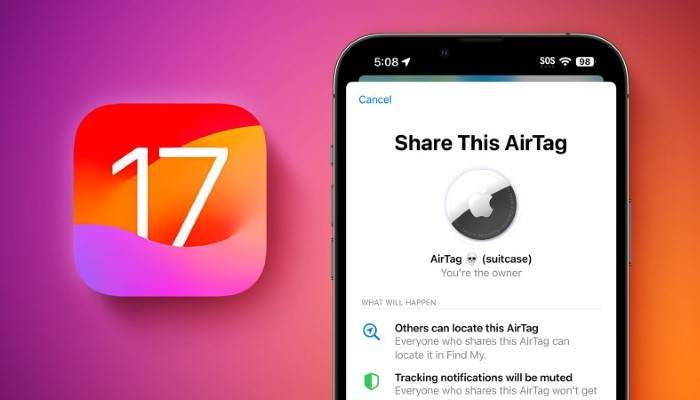
The short answer is no; Apple currently does not allow users to share the location of an AirTag with other people through the Find My app. Each AirTag is linked to a single Apple ID, and its location data is only accessible to the owner of that Apple ID. This design prioritizes privacy and security, ensuring that only the owner can track the AirTag.
Why Can’t You Share AirTag Location?
Privacy and Security Concerns
Apple has designed AirTags with privacy and security in mind. Allowing multiple users to access an AirTag’s location could potentially lead to misuse or unauthorized tracking. By restricting access to a single Apple ID, Apple ensures that only the owner can monitor the AirTag’s location, protecting user privacy.
Technical Limitations
AirTags are deeply integrated into the Apple ecosystem, and the Find My app is built to work with a single user’s account. Adding multi-user functionality would require significant changes to the app’s architecture and could introduce complexities that might affect the user experience.
Alternatives to Sharing AirTag Location
Using Family Sharing for Find My Devices
While you cannot share an AirTag’s location directly, you can use Apple’s Family Sharing feature to share the location of other Apple devices. Family Sharing allows family members to share their locations with each other, making it easier to track iPhones, iPads, and Macs.
Sharing Apple ID Credentials
Another workaround is to share your Apple ID credentials with a trusted person. However, this method is not recommended due to privacy and security risks. Sharing your Apple ID can give others access to your personal information and data.
Features of the Find My App
Precision Finding
Precision Finding is a feature that uses Ultra-Wideband technology to provide accurate directions to your AirTag. When you are within range, your iPhone can display the exact distance and direction to your AirTag, making it easy to locate even in cluttered environments.
Find My Network
The Find My network leverages a vast and secure system of Apple devices to help locate your AirTag. If your AirTag is lost, it sends out a secure Bluetooth signal that nearby devices can detect. These devices then anonymously relay the location back to you, significantly expanding the effective range of your AirTag.
Notifications and Alerts
The Find My app allows you to set notifications and alerts for your AirTag. For example, you can receive an alert when your AirTag is found by another device in the Find My network. These notifications help you stay informed about the status of your AirTag and can be crucial in recovering lost items.
Best Practices for Using AirTags
Proper Placement of AirTags
For optimal performance, place your AirTag in a location where it is unlikely to experience interference or physical obstructions. For example, attaching it to the outside of a bag rather than inside a densely packed compartment can improve connectivity and accuracy.
Regular Maintenance and Battery Replacement
Regularly check the battery status of your AirTag and replace it promptly when needed. The battery life of an AirTag is approximately one year under normal usage conditions. When the battery is low, you will receive a notification from the Find My app.
Monitoring Battery Health
Use the Find My app to monitor the battery health regularly and replace the battery as soon as you receive a low battery notification to avoid any downtime in tracking.
AirTag Use Cases
Keeping Track of Keys and Wallets
AirTags are ideal for tracking everyday items like keys and wallets. Attach an AirTag to your keyring or slip it into your wallet to ensure you can always locate these essential items quickly.
Monitoring Bags and Luggage
AirTags can also be used to keep track of bags and luggage, making them particularly useful for travelers. Place an AirTag in your suitcase to help you locate it at baggage claim or if it gets lost during your journey.
Pet Tracking
Attach an AirTag to your pet’s collar to monitor their whereabouts. This provides peace of mind knowing you can find your pet if they wander off. While AirTags are not a substitute for a dedicated pet tracker, they can be a useful addition for monitoring your pet’s location.
Securing Electronics
Attach AirTags to electronics like cameras, tablets, and laptops. This helps you locate these valuable items if they are misplaced or stolen. Securing your electronics with AirTags can protect your investment and ensure you always know where your devices are.
Using AirTags for Outdoor Gear
Attach AirTags to outdoor gear such as bicycles, camping equipment, and sports gear. This can help you keep track of your items during outdoor activities and ensure they are not lost or stolen.
Privacy and Security Features
End-to-End Encryption
AirTags use end-to-end encryption to ensure that your location data is secure. The location data and history are never stored on the AirTag itself. Communication with the Find My network is encrypted, ensuring that only you can see where your AirTag is located.
Anti-Stalking Measures
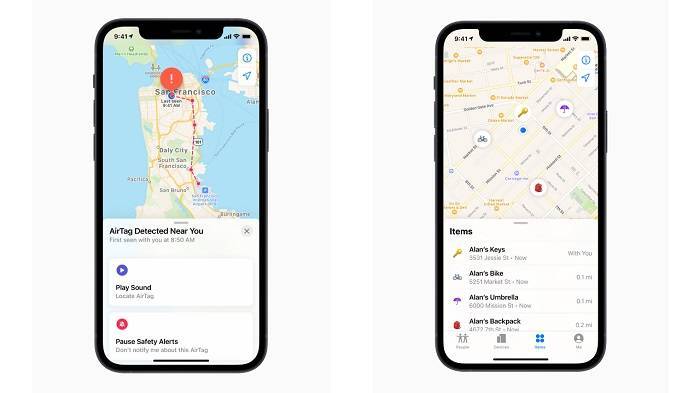
AirTag includes anti-stalking features to prevent unwanted tracking. If an unknown AirTag is found moving with you, your iPhone will alert you. You can then use your device to disable the AirTag. This feature ensures that AirTags cannot be used to track people without their knowledge.
Lost Mode
If you lose an item with an AirTag attached, you can enable Lost Mode in the Find My app. When Lost Mode is activated, your AirTag will send notifications when it is detected by another device in the Find My network. You can also enter contact information so that anyone who finds your AirTag can reach you.
Advanced AirTag Features
Upcoming Features for AirTag
Apple continuously updates its products to improve functionality and security. Future updates for AirTag may include enhancements to Precision Finding, expanded compatibility, and new anti-stalking measures.
Integrating AirTags with Smart Home Devices
AirTags can potentially be integrated with smart home devices through the Apple HomeKit. This integration could allow users to automate tasks based on the location of their AirTags, providing even greater convenience and functionality.
Expanding the Find My Network
As more Apple devices join the Find My network, the accuracy and reliability of AirTag tracking will continue to improve. This expansion will make it even easier to locate lost items quickly and efficiently.
Frequently Asked Questions
Can you share AirTag location with others?
No, Apple does not currently allow users to share AirTag location with others through the Find My app. Each AirTag is linked to a single Apple ID, and its location data is only accessible to the owner of that Apple ID.
Is there a way to work around this limitation?
While direct sharing is not possible, you can use Apple’s Family Sharing feature to share the location of other Apple devices. Alternatively, sharing your Apple ID credentials with a trusted person can provide access, but it is not recommended due to privacy and security risks.
What are the privacy and security features of AirTag?
AirTags use end-to-end encryption for communication, ensuring that only you can see where your AirTag is located. They also include anti-stalking measures to prevent unwanted tracking and provide alerts if an unknown AirTag is found moving with you.
How do I enable Lost Mode on my AirTag?
To enable Lost Mode, open the Find My app, select your AirTag, and tap ‘Enable’ under Lost Mode. Enter your contact information so that anyone who finds your AirTag can reach you, and then tap ‘Activate.’
Can AirTags be integrated with smart home devices?
While not currently available, future updates may allow AirTags to be integrated with smart home devices through Apple HomeKit. This integration could enable users to automate tasks based on the location of their AirTags.
Related Post:
How to Check AirTag Battery: A Comprehensive Guide
Exploring the Best AirTag Alternatives: A Complete Guide
Safeguarding Your Furry Friend: The Ultimate Guide to Using an AirTag for Dog
Understanding whether you can share AirTag location and exploring related features is crucial for maximizing the functionality of your AirTag. While direct sharing of AirTag location is not possible, there are alternative methods and workarounds that can help. By following best practices for using AirTags, such as proper placement, regular maintenance, and utilizing advanced features, you can ensure that your AirTag remains a reliable tool for tracking your personal items. Whether you use AirTags for everyday items, travel, or outdoor gear, this comprehensive guide ensures you get the most out of your Apple AirTag investment.