


In this modern age of technology, we’ve come to rely on our devices to assist us in numerous aspects of our daily lives. One such device that has gained popularity for its tracking capabilities is the Apple AirTag. These tiny, coin-sized trackers have been a game-changer for those prone to misplacing their belongings, but what happens when your AirTag’s location doesn’t update as expected? In this article, we’ll dive deep into the world of AirTags, exploring the reasons behind location update issues and how to troubleshoot them effectively.
Understanding the Basics of AirTags
Before we delve into the troubleshooting process, let’s take a moment to understand what AirTags are and how they work.
What Are AirTags?
AirTags are compact, Bluetooth-enabled tracking devices designed by Apple. They are designed to help users locate and keep tabs on their personal items, such as keys, wallets, and bags. AirTags are equipped with various sensors and technologies, including Bluetooth Low Energy (BLE), Ultra Wideband (UWB), and the Find My network, to provide accurate location tracking.
How Do AirTags Work?
AirTags work in tandem with the Find My app on your Apple device. When you attach an AirTag to an item, it emits a Bluetooth signal that can be picked up by nearby Apple devices. These devices, acting as part of the Find My network, anonymously relay the AirTag’s location to your iCloud account. This allows you to track your lost or misplaced items using the Find My app.
Common Reasons for Location Update Issues
Now that we have a basic understanding of AirTags, let’s explore some common reasons why your AirTag’s location may not be updating as expected.
1. Poor Bluetooth Connectivity
Bluetooth Connection: AirTags rely on Bluetooth connectivity to communicate with nearby Apple devices. If your AirTag is out of Bluetooth range or experiences connectivity issues, its location updates may be delayed or inaccurate.
2. Insufficient Battery Life
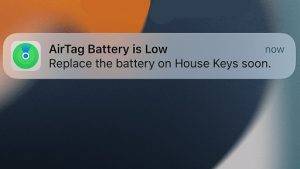
Low Battery: Each AirTag comes with a replaceable battery that should last about a year under normal usage. If the battery is running low, it can impact the AirTag’s ability to update its location regularly.
3. AirTag Is Out of Range
Out of Range: AirTags have a limited range for communication with nearby devices. If your AirTag is too far away from any Apple device within the Find My network, it won’t be able to update its location.
4. AirTag Is in a Dead Zone
No Network Coverage: In areas with limited or no cellular or Wi-Fi coverage, your AirTag may struggle to update its location. This can be particularly problematic in rural or remote locations.
5. AirTag Is in Lost Mode
Lost Mode: When you activate Lost Mode on an AirTag, it can conserve battery life by updating its location less frequently. This is to ensure that the battery lasts longer while you attempt to recover your lost item.
Troubleshooting Your AirTag’s Location Update Issues
Now that we’ve identified some common reasons for location update problems, let’s explore how you can troubleshoot these issues.
1. Check Bluetooth Connectivity
Ensure Bluetooth Is On: Make sure that Bluetooth is enabled on your Apple device. Without an active Bluetooth connection, your device won’t be able to communicate with the AirTag.
Restart Bluetooth: Sometimes, a simple Bluetooth restart can resolve connectivity issues. Turn off Bluetooth on your device, wait a few seconds, and then turn it back on.
2. Verify Battery Status
Check Battery Life: Open the Find My app and navigate to the AirTag’s profile. Here, you can check the battery status of your AirTag. If it’s low, replace the battery.
3. Bring Your Device Closer
Get Closer: If your AirTag is out of range, try to bring your Apple device closer to the tracker. This should facilitate better communication and more frequent location updates.
4. Check Network Coverage

Ensure Network Connectivity: Make sure that your Apple device has an active internet connection. Without internet access, the Find My app won’t be able to retrieve updated location information from the Find My network.
5. Disable Lost Mode
Deactivate Lost Mode: If you’ve activated Lost Mode on your AirTag, consider deactivating it temporarily to allow for more frequent location updates. Remember to re-enable it once your item is found.
Advanced Troubleshooting Steps
If the basic troubleshooting steps don’t resolve your AirTag’s location update issues, you may need to consider more advanced solutions.
6. Update iOS/iPadOS
Keep Software Up to Date: Ensure that your iPhone or iPad is running the latest version of iOS or iPadOS. Outdated software can sometimes cause compatibility issues with AirTags.
7. Remove and Re-Pair Your AirTag
Unpair and Re-Pair: To refresh the connection between your AirTag and device, unpair the AirTag and then re-pair it. This can sometimes resolve stubborn connectivity problems.
8. Contact Apple Support
Reach Out to Apple: If all else fails, it’s a good idea to contact Apple Support. They can provide further assistance and may be able to diagnose any hardware issues with your AirTag.
Also Read: What Is The Range Of An Air Tag
Privacy and Security Considerations
While troubleshooting your AirTag’s location update issues, it’s crucial to keep privacy and security in mind.
9. Protect Your Privacy
Privacy Concerns: Always be mindful of privacy concerns when using tracking devices like AirTags. Avoid using them to track people without their consent.
10. Enable Safety Alerts
Safety Alerts: If someone else’s AirTag is with you and not in your possession, your iPhone will notify you. This feature is designed to prevent unauthorized tracking.
AirTags have undoubtedly made our lives easier when it comes to tracking our belongings. However, they are not immune to occasional location update issues. By understanding the basics of AirTags, identifying common problems, and following the troubleshooting steps outlined in this article, you can ensure that your AirTag operates smoothly and reliably. Whether you’re using an AirTag to keep tabs on your keys, luggage, or any other valuable item, a little troubleshooting can go a long way in ensuring that you always know where your belongings are. So, don’t let location update issues hinder your tracking experience—get your AirTag back on track today!