

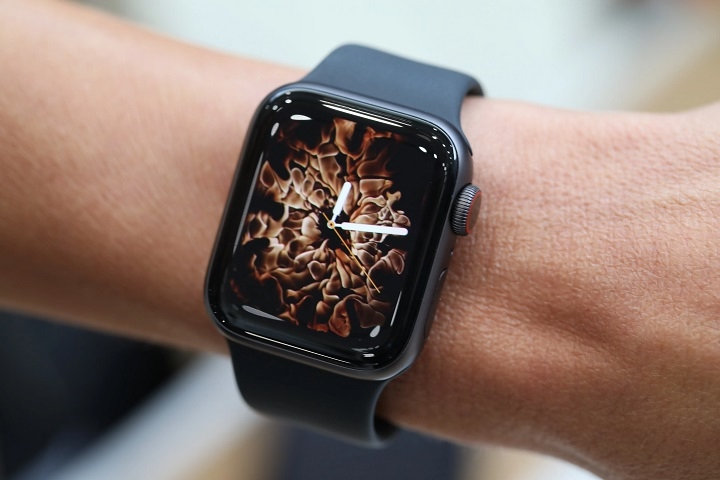
Apple Watch Series 4 was released in 2018 as a major upgrade over its predecessors. It introduced a larger display, a redesigned body, and new health-focused features such as the ECG app. Even though newer models have since been released, many people still consider the Apple Watch Series 4 for its reliability and affordability.
This guide explores the features, performance, and whether the Apple Watch Series 4 is still worth buying today.
Apple Watch Series 4 Overview

Apple Watch Series 4 was a significant improvement over previous models, featuring a larger display, a more powerful processor, and new health monitoring tools.
Key Specifications
| Feature | Apple Watch Series 4 |
| Release Year | 2018 |
| Sizes | 40mm and 44mm |
| Display | LTPO OLED Retina |
| Processor | S4 dual-core chip |
| Operating System | watchOS |
| Health Features | ECG app, heart rate monitoring, fall detection |
| Water Resistance | 50 meters |
| Connectivity | GPS, GPS + Cellular |
| Battery Life | Up to 18 hours |
| Storage | 16GB |
Apple Watch Series 4 Features
Larger Edge-to-Edge Display
One of the biggest upgrades in the Series 4 was the larger, edge-to-edge display, offering more screen space than previous models. The display is brighter and sharper, making it easier to read notifications and track workouts.
Redesigned and Thinner Body
Apple Watch Series 4 introduced a slimmer body while increasing the display size. The design is more comfortable for all-day wear, and the curved edges make it look more modern.
ECG and Heart Health Monitoring
For the first time, Apple introduced electrocardiogram (ECG) functionality in the Apple Watch Series 4. The ECG app allows users to take a heart reading and detect irregular heart rhythms such as atrial fibrillation.
The watch also provides 24/7 heart rate monitoring, sending alerts if the heart rate is too high or too low.
Fall Detection and Emergency SOS
Series 4 introduced fall detection, which can detect a hard fall and automatically call emergency services if the wearer does not respond. The Emergency SOS feature also allows users to contact emergency services quickly.
Faster S4 Chip
The S4 dual-core processor delivers twice the speed of the previous model. This ensures smoother performance when navigating apps and using fitness tracking features.
watchOS Support and Features
The Apple Watch Series 4 runs watchOS, offering features like:
- Activity tracking
- Apple Pay support
- Siri voice commands
- Walkie-Talkie mode
- Customizable watch faces
Apple Watch Series 4 Performance
Even though it was released in 2018, the Apple Watch Series 4 remains a capable smartwatch. The S4 chip is still fast enough for most tasks, and the display quality is excellent. The battery life lasts up to 18 hours, which is typical for most Apple Watches.
For basic smartwatch functions, fitness tracking, and heart monitoring, the Series 4 still performs well. However, newer models have better battery life, faster processors, and additional health sensors.
Apple Watch Series 4 vs. Newer Models

Apple has released several newer models since the Series 4. Here is how it compares to recent versions.
| Feature | Apple Watch Series 4 | Apple Watch SE (2022) | Apple Watch Series 7 | Apple Watch Series 9 |
| Display Size | 40mm / 44mm | 40mm / 44mm | 41mm / 45mm | 41mm / 45mm |
| Processor | S4 | S8 | S7 | S9 |
| ECG App | Yes | No | Yes | Yes |
| Blood Oxygen Sensor | No | No | Yes | Yes |
| Fall Detection | Yes | Yes | Yes | Yes |
| Battery Life | Up to 18 hours | Up to 18 hours | Up to 18 hours | Up to 36 hours |
| Always-On Display | No | No | Yes | Yes |
Newer models offer faster performance, more health sensors, and improved battery life, but the Series 4 still holds up well for general smartwatch use.
Should You Still Buy the Apple Watch Series 4?
Reasons to Buy
- More affordable than newer models
- Still supports ECG and heart health monitoring
- Large display with a comfortable design
- Works well with iPhones running the latest iOS
Reasons to Upgrade
- Lacks blood oxygen and temperature sensors
- No always-on display, which is available in newer models
- Shorter battery life compared to newer watches
- May not receive future watchOS updates
If budget is a concern, the Apple Watch Series 4 is still a great option for fitness tracking and notifications. However, those looking for the latest features should consider newer Apple Watch models.
How to Set Up Apple Watch Series 4
Setting up the Apple Watch Series 4 is simple.
- Turn on the Apple Watch by pressing and holding the side button.
- Bring the iPhone close to the Apple Watch.
- Follow the on-screen instructions to pair the devices.
- Sign in with an Apple ID.
- Customize settings, including app preferences and health tracking features.
Once set up, the Apple Watch is ready for notifications, fitness tracking, and Siri commands.
Common Issues and Fixes
Battery Draining Quickly
- Reduce screen brightness in settings.
- Disable background app refresh for apps that are not in use.
- Turn off unnecessary notifications to extend battery life.
Watch Not Syncing with iPhone
- Ensure Bluetooth and Wi-Fi are enabled on both devices.
- Restart the Apple Watch and iPhone to refresh the connection.
ECG App Not Working
- Ensure the watchOS is updated to the latest version.
- Check if ECG is available in the region, as some countries do not support this feature.
Touchscreen Not Responding
- Clean the display to remove any dust or moisture.
- Restart the Apple Watch and try again.
Frequently Asked Questions
Is Apple Watch Series 4 still good in 2024?
Yes, it is still a capable smartwatch for fitness tracking, heart monitoring, and notifications. However, it may not receive watchOS updates for much longer.
Does Apple Watch Series 4 support blood oxygen monitoring?
No, blood oxygen monitoring was introduced in Apple Watch Series 6.
Is the Apple Watch Series 4 waterproof?
It is water-resistant up to 50 meters, meaning it can handle swimming but not deep diving.
Can I use Apple Pay on Apple Watch Series 4?
Yes, Apple Pay works on Apple Watch Series 4 for contactless payments.
Does Apple Watch Series 4 have an always-on display?
No, the always-on display feature was introduced in Apple Watch Series 5.
Apple Watch Series 4 remains a solid smartwatch with ECG monitoring, a large display, and strong performance. It is a great option for those looking for an affordable Apple Watch with essential features.
However, those who want longer battery life, an always-on display, and more advanced health tracking should consider upgrading to a newer model.