

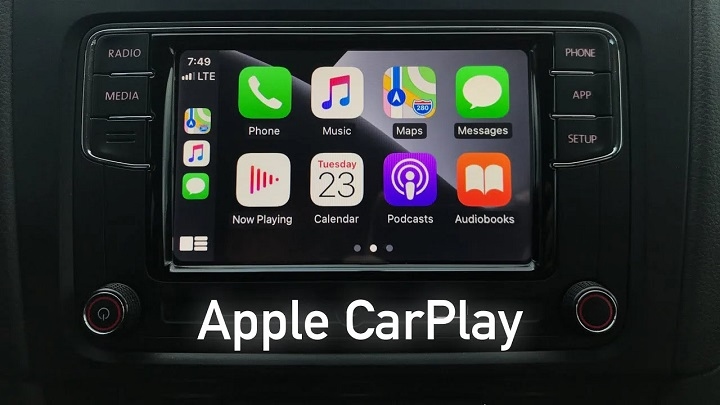
Apple CarPlay brings the power of your iPhone directly to your vehicle’s dashboard—offering safer navigation, hands-free texting, Siri voice commands, and seamless music streaming. But what if your car doesn’t come with it built-in? Fortunately, you don’t need a brand-new vehicle to enjoy this tech. You can install Apple CarPlay in an old car with a few practical steps and the right tools.
In this guide, you’ll learn everything you need to know about retrofitting Apple CarPlay into your existing vehicle, including hardware options, installation methods, compatibility tips, and cost breakdowns.
What Is Apple CarPlay?
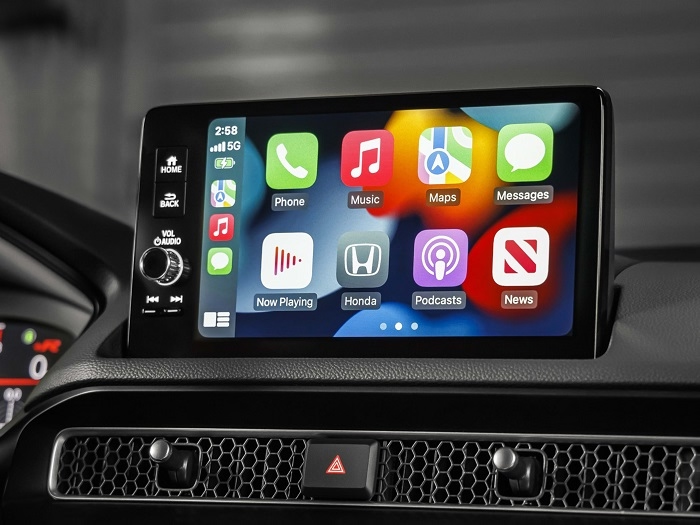
Apple CarPlay is Apple’s infotainment system that mirrors your iPhone’s interface on your car’s screen. Once connected via USB or wirelessly, you can access apps like:
- Apple Maps and Google Maps
- Messages and WhatsApp
- Apple Music, Spotify, and Podcasts
- Phone calls and voice commands via Siri
CarPlay improves safety by reducing distractions and encouraging voice-based interaction.
Can You Add CarPlay to an Older Car?
Yes, even if your car is more than a decade old, you can install Apple CarPlay by upgrading your head unit (the central display system). You’ll either replace your existing stereo or add a portable CarPlay display.
Two Main Methods:
- Replace the Factory Stereo with a CarPlay-Compatible Head Unit
- Use a Portable CarPlay Display Unit
We’ll explain both options below in detail.
Replacing the Head Unit
This is the most seamless and professional way to integrate CarPlay into an old car.
What You Need:
- A double-DIN or single-DIN CarPlay stereo (Pioneer, Kenwood, Alpine, Sony, etc.)
- Dash kit to fit the new stereo into your vehicle’s dashboard
- Wiring harness compatible with your car model
- Optional: Backup camera and microphone
Step-by-Step Installation:
- Choose the Right CarPlay Stereo
- Look for features like wireless CarPlay, Bluetooth, backup camera input, and HD touchscreen.
- Buy a Dash Kit and Wiring Harness
- Use compatibility tools on websites like Crutchfield or Best Buy.
- Remove the Factory Stereo
- Disconnect the battery
- Use prying tools to remove dash panels
- Unscrew and unplug the old unit
- Wire the New Head Unit
- Match wires using the harness
- Secure connections using crimp tools or solder
- Install the CarPlay Unit
- Mount the unit using the dash kit
- Reconnect battery and test functionality
- Configure Settings
- Set language, time, and enable CarPlay in the settings
- Connect your iPhone using USB or Bluetooth
Pros and Cons:
| Pros | Cons |
| Clean, integrated look | More expensive upfront |
| Better sound and display quality | Requires professional installation (optional) |
| Supports multiple features | Takes 1–2 hours for DIY installation |
Using a Portable CarPlay Display
For older cars where stereo replacement is not practical or desired, portable displays are a quick alternative.
What You Need:
- A portable CarPlay unit (brands like Carpuride, Ottocast, or Intellidash)
- Power source via cigarette lighter or USB
- Mounting tools (suction cup or adhesive bracket)
How to Set It Up:
- Mount the display on your dashboard or windshield
- Plug into a 12V power outlet
- Connect your iPhone via USB or Bluetooth
- Pair the device and enable CarPlay
Pros and Cons:
| Pros | Cons |
| Easy plug-and-play setup | Wires can clutter dashboard |
| No modification needed | External speakers may be required |
| Affordable | Aesthetic is less integrated |
Estimated Costs for Installing Apple CarPlay
Here’s a breakdown of potential costs based on installation method:
| Component | Estimated Price (USD) |
| CarPlay Head Unit | $250 – $800 |
| Dash Kit + Wiring Harness | $50 – $100 |
| Professional Installation | $100 – $300 (optional) |
| Portable CarPlay Display | $100 – $300 |
| Additional Accessories (Mic, Camera) | $20 – $100 |
Total Estimated Costs:
- DIY Stereo Replacement: $300 – $500
- Professional Installation: $500 – $800
- Portable Display Option: $100 – $300
Compatibility and Requirements
Before buying anything, ensure your chosen CarPlay solution is compatible with:
- Your vehicle’s stereo size (single or double DIN)
- Your iPhone model (CarPlay requires iOS 7.1 or later)
- iPhone cable or Bluetooth for wireless connection
Check the product description and fitment tools online for guidance.
Best Apple CarPlay Head Units for Older Cars
Top Picks:
- Pioneer AVH-W4500NEX – Wireless CarPlay, large screen
- Kenwood Excelon DMX907S – Great audio quality
- Sony XAV-AX3200 – Budget-friendly and responsive
- Alpine iLX-W650 – Slim design, ideal for tight spaces
- Intellidash+ Portable – Quick setup, ideal for rentals or classic cars
Each option has its strengths, so choose based on your needs and budget.
Tips to Maximize Your CarPlay Experience
- Use a quality lightning cable for stable connection
- Enable Do Not Disturb While Driving to reduce distractions
- Customize your CarPlay screen in iPhone settings under General > CarPlay
- Keep your iPhone updated for latest features and fixes
- Add a backup camera to enhance safety if you’re replacing the stereo
FAQs
Can I install Apple CarPlay in a car with no touchscreen?
Yes, by upgrading to a touchscreen stereo or using a portable display unit.
Is wireless CarPlay available in all aftermarket units?
Not all. Make sure the product specifically lists “wireless CarPlay” if that’s your preference.
Does installing CarPlay void my car’s warranty?
No, as long as the installation doesn’t damage other vehicle systems.
Can I use CarPlay with Android phones?
No, Apple CarPlay is for iPhones only. Android users need Android Auto.
Is a portable CarPlay display as good as a built-in one?
Functionally yes, but built-in systems offer better integration and cleaner aesthetics.