

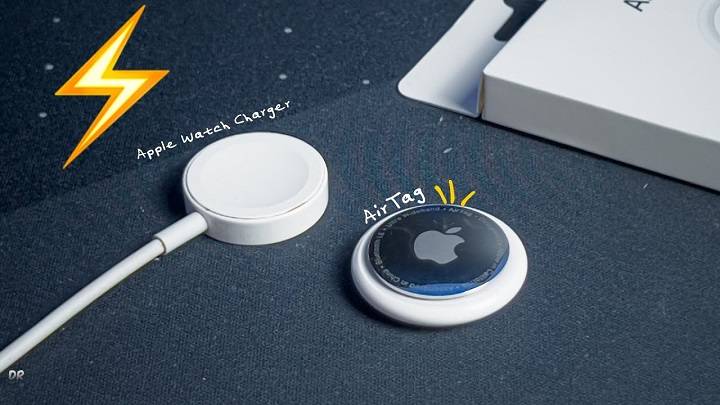
Apple’s AirTag is a cutting-edge device designed to help you keep track of your belongings. One of the most common questions from new users is, “how to charge an AirTag?” This comprehensive guide will answer this question in detail and explore various related topics to ensure you get the most out of your AirTag.
Understanding AirTag Battery Requirements

What is an AirTag?
An AirTag is a small, circular tracking device developed by Apple to help you locate personal items such as keys, wallets, bags, and more. By attaching an AirTag to your items, you can easily find them using the Find My app on your iPhone or other Apple devices.
How AirTag Batteries Work
AirTags use a CR2032 lithium coin cell battery, which is not rechargeable. This type of battery provides long-lasting power and is easily replaceable when depleted. Unlike other devices that require frequent charging, AirTags are designed for low maintenance with a battery life of approximately one year.
Can You Charge an AirTag?
Why AirTags Don’t Need Charging
Unlike many modern electronic devices, AirTags do not need to be charged because they use a disposable CR2032 battery. This design choice ensures that the AirTag can operate for an extended period without the need for regular recharging, making it convenient for users who prefer low-maintenance devices.
How to Replace an AirTag Battery
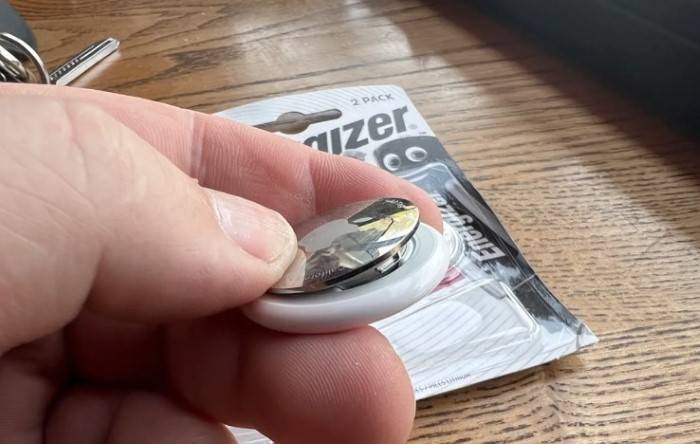
While you cannot charge an AirTag, you can easily replace its battery. Here’s how:
- Open the AirTag: Press down on the stainless steel back cover and rotate it counterclockwise until it stops.
- Remove the Old Battery: Take out the depleted CR2032 battery.
- Insert the New Battery: Place a new CR2032 battery into the AirTag with the positive side facing up.
- Close the AirTag: Align the three tabs on the cover with the slots on the AirTag, press down, and rotate the cover clockwise until it stops.
Battery Life of an AirTag

How Long Does an AirTag Battery Last?
Under normal usage conditions, the battery in an AirTag is designed to last approximately one year. This duration can vary based on factors such as the frequency of usage and environmental conditions.
Factors Affecting Battery Life
- Usage Frequency: Frequent use of features like Precision Finding and sound alerts can drain the battery faster.
- Environmental Conditions: Extreme temperatures can impact battery performance and longevity.
- Bluetooth Connectivity: Constant Bluetooth connection with your iPhone can affect battery usage.
Maximizing AirTag Battery Life
Best Practices for Battery Management
- Limit Frequent Use: Use features like Precision Finding and sound alerts only when necessary.
- Store Properly: Avoid exposing your AirTag to extreme temperatures.
- Monitor Battery Status: Regularly check the battery status through the Find My app and replace it promptly when needed.
Efficient Usage Tips
- Turn Off When Not in Use: If possible, turn off the AirTag when not needed for extended periods.
- Use Alerts Sparingly: Minimize the use of sound alerts and notifications to conserve battery.
Software Optimization
Ensure that your iPhone and the Find My app are running the latest software versions. Updates often include optimizations that can improve battery performance.
Comparing AirTag Battery Life with Other Trackers

Tile Trackers
Tile trackers also use non-replaceable batteries, which last about a year. After the battery depletes, the entire tracker needs to be replaced.
Samsung Galaxy SmartTag
Samsung Galaxy SmartTag uses a replaceable CR2032 battery, similar to the AirTag, with a battery life of around one year.
Chipolo
Chipolo trackers use replaceable CR2032 batteries and offer a battery life comparable to AirTags, making them another suitable alternative.
Comparison Table
| Feature | Apple AirTag | Tile Trackers | Samsung Galaxy SmartTag | Chipolo |
| Battery Type | Replaceable CR2032 | Non-replaceable | Replaceable CR2032 | Replaceable CR2032 |
| Battery Life | ~1 year | ~1 year | ~1 year | ~1 year |
| Replaceability | Yes | No | Yes | Yes |
| Price of Replacement | Low (battery only) | High (entire device) | Low (battery only) | Low (battery only) |
| Ease of Replacement | Easy | N/A | Easy | Easy |
| Environmental Impact | Low (recycling battery) | High (replace entire device) | Low (recycling battery) | Low (recycling battery) |
Environmental Considerations
Battery Disposal
Proper disposal of old batteries is crucial for environmental sustainability. Used CR2032 batteries should be recycled at designated battery recycling centers to prevent harmful chemicals from entering the environment.
Eco-Friendly Alternatives
While AirTags use disposable batteries, opting for rechargeable CR2032 batteries, if compatible, can help reduce waste. Additionally, choosing battery brands that focus on sustainable practices can contribute to environmental conservation.
Reducing Carbon Footprint
By using devices with replaceable batteries, such as AirTags, you reduce the need to frequently replace entire devices, which helps in reducing electronic waste and the carbon footprint associated with manufacturing and shipping new products.
Real-World Battery Performance

User Experiences
Many users report that their AirTag batteries last close to the expected one-year mark. However, heavy usage of features like sound alerts and Precision Finding can slightly reduce this lifespan.
Case Studies
Case studies show that AirTags used primarily for static items (like in a wallet or on keys) often meet or exceed the one-year battery life, while those used on frequently moved items (like pet collars) may see a shorter battery life due to more frequent location updates.
Testing Under Various Conditions
Tests conducted under different environmental conditions indicate that extreme temperatures can affect battery performance. AirTags used in very cold or hot environments tend to have shorter battery lives compared to those used in moderate climates.
Maintenance Tips for Prolonging Battery Life
Regular Inspections
Periodically check the physical condition of your AirTag to ensure it’s not damaged, which can affect battery life.
Cleaning
Keep your AirTag clean and free from dust and debris, which can interfere with the battery contacts.
Monitoring Battery Health
Use the Find My app to monitor the battery health regularly and replace the battery as soon as you receive a low battery notification to avoid any downtime in tracking.
Protective Accessories
Using protective cases or holders can help shield your AirTag from environmental stressors that could impact battery life.
How to Charge an AirTag: Common Misconceptions
Understanding AirTag’s Design
A common misconception is that AirTags need to be charged like other electronic devices. However, AirTags are designed with a replaceable battery system, making them low-maintenance and easy to manage.
Why Charging is Not an Option
The use of a disposable CR2032 battery in AirTags is intentional to provide a hassle-free user experience. The battery’s one-year lifespan means users don’t need to worry about frequent charging or downtime.
Benefits of a Replaceable Battery
The replaceable battery design allows users to quickly swap out a depleted battery for a new one, ensuring continuous operation without the need to plug in and wait for a charge.
Frequently Asked Questions
How do I charge an AirTag?
AirTags do not require charging. Instead, they use a replaceable CR2032 battery that needs to be replaced when depleted.
How long does the AirTag battery last?
The AirTag battery is designed to last approximately one year under normal usage conditions.
How will I know when my AirTag battery needs replacing?
The Find My app will notify you when the battery is running low, giving you ample time to replace it.
Where can I buy replacement batteries for my AirTag?
Replacement CR2032 batteries can be purchased from electronic stores, supermarkets, and online retailers. Reliable brands include Duracell, Energizer, and Panasonic.
Can I use rechargeable batteries in my AirTag?
While standard CR2032 batteries are recommended, some rechargeable CR2032 batteries may be compatible. However, their performance and longevity may vary.
Related Post:
How to Reset an AirTag: A Comprehensive Guide
How to Set Up AirTag: A Comprehensive Guide
Does AirTag Work with Android? A Comprehensive Guide
Understanding how to manage the battery of your AirTag is crucial for ensuring its continuous functionality. Although you cannot charge an AirTag, knowing how to replace its battery and maximize its lifespan can help you make the most of this innovative tracking device. By following the tips and guidelines provided in this guide, you can ensure that your AirTag remains operational, providing peace of mind and enhanced convenience in your daily life. Whether you use AirTags for everyday items, travel, or outdoor gear, this comprehensive guide ensures you get the most out of your Apple AirTag investment.