

In an era where connectivity and safety are paramount, sharing Airtags with family members has become a popular choice for keeping track of loved ones and valuables. This comprehensive guide will delve into the intricacies of sharing Airtags with family, providing step-by-step instructions, practical tips, and answering common questions to ensure a seamless experience for all users.
Understanding Airtag Sharing

What is Airtag Sharing?
Airtag Sharing allows multiple users to track the location of a single Airtag through their Apple devices. By sharing Airtags with family members, users can collaborate to keep track of important items such as keys, bags, and even pets.
Benefits of Sharing Airtags
- Enhanced safety and security for family members and belongings.
- Simplified tracking process through collaboration.
- Peace of mind knowing the whereabouts of loved ones and valuables.
Getting Started with Airtag Sharing
Setting Up Airtag Sharing
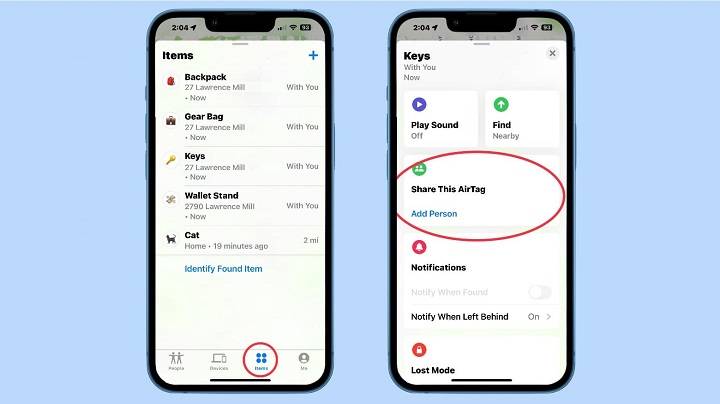
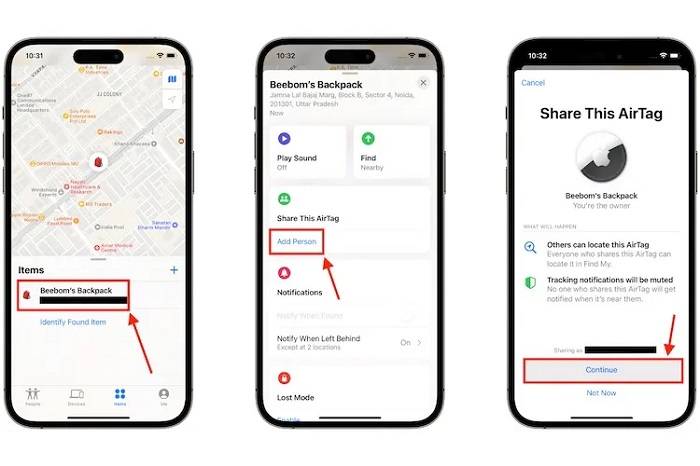
- Activate Airtag Sharing: Open the Find My app on your Apple device and navigate to the “Items” tab. Select the Airtag you wish to share and tap “Share.” Follow the on-screen instructions to invite family members to share the Airtag.
- Accepting Airtag Sharing Invitations: Family members will receive a notification inviting them to share the Airtag. Once accepted, they will have access to the Airtag’s location through the Find My app.
Managing Shared Airtags
- Adding and Removing Users: As the owner of the Airtag, you have the ability to add or remove family members from the sharing group at any time.
- Customizing Permissions: Customize each family member’s permissions, allowing them to view the Airtag’s location or receive notifications when it is separated from their device.
Best Practices for Airtag Sharing
Communicate with Family Members
Open communication is key to successful Airtag sharing. Ensure that all family members are aware of the Airtag’s purpose, permissions, and how to use the Find My app effectively.
Respect Privacy and Boundaries
While Airtag sharing offers convenience and safety, it’s essential to respect privacy boundaries. Only share Airtags with trusted family members and avoid tracking individuals without their consent.
Tips for Optimizing Airtag Sharing
Labeling Airtags
Assign unique names or labels to Airtags to easily identify their purpose or the item they are attached to. This helps streamline tracking and organization, especially when sharing multiple Airtags with family members.
Utilizing Precision Finding
Take advantage of Precision Finding, a feature available on compatible iPhones, to quickly locate Airtags with pinpoint accuracy. This can be especially useful in crowded or unfamiliar locations.
Sharing Airtags with Family: Exploring Key Concepts
Understanding Family Sharing
Family Sharing is a feature offered by Apple that allows family members to share select services, purchases, and now even Airtags with one another. This section will delve into the concept of Family Sharing, highlighting its benefits and how it applies to Airtags.
Benefits of Family Sharing
- Cost Efficiency: Family Sharing enables users to share subscriptions and purchases, reducing overall costs.
- Convenience: It streamlines the process of managing shared services and permissions within the family unit.
- Enhanced Connectivity: With Airtag sharing integrated into Family Sharing, users can easily keep track of each other’s belongings for added peace of mind.
Airtag Safety Features
Discussing the safety features of Airtags can help users understand how these devices prioritize privacy and security.
Safety Measures
- Safety Alerts: Airtags are equipped with safety features that alert users if an unknown Airtag is detected traveling with them.
- Privacy Controls: Users have the ability to disable unwanted tracking or alerts, ensuring their privacy is respected at all times.
- Lost Mode: In the event that an Airtag is lost, users can activate Lost Mode to notify them when it’s located by another Apple device.
Integrating Airtags into Daily Life
Exploring practical applications of Airtags within daily routines can provide users with inspiration and ideas for utilizing these devices effectively.
Everyday Uses
- Keys and Wallets: Attaching Airtags to keys, wallets, or bags ensures these essential items are never misplaced.
- Pets: Airtags can be attached to pet collars, allowing pet owners to track their furry friends’ whereabouts in real-time.
- Travel: Airtags can be invaluable travel companions, helping users keep track of luggage or backpacks during trips.
Tips for Effective Airtag Usage

Offering practical tips and tricks for maximizing the utility of Airtags can empower users to make the most of these innovative tracking devices.
Location Placement
- Strategic Placement: Positioning Airtags in optimal locations on items ensures accurate tracking and minimizes interference.
- Durability Considerations: Choosing durable Airtag accessories, such as holders or cases, can protect Airtags from damage during everyday use.
Compatibility and Device Requirements
Providing information about compatibility and device requirements ensures users have the necessary tools to successfully set up and use Airtags.
Device Compatibility
- iOS Version: Airtags require devices running iOS 14.5 or later for optimal performance.
- Accessories: Certain Airtag accessories may enhance functionality but require specific device models or software versions for compatibility.
Common Questions About Airtag Sharing
Can I share Airtags with non-family members?
Airtag sharing is primarily designed for sharing with family members. While it may be possible to share with non-family members in some cases, it’s recommended to limit sharing to trusted individuals.
Can I track the location of family members’ devices with Airtag Sharing?
Airtag Sharing is specifically designed to track the location of Airtags, not individual devices. However, family members can use the Find My app’s location sharing feature to share their device’s location with each other.
Can I revoke Airtag Sharing permissions?
Yes, as the owner of the Airtag, you have the ability to revoke sharing permissions for any family member at any time through the Find My app.
Is Airtag Sharing available on Android devices?
Airtag Sharing is currently only available on Apple devices running iOS 14.5 or later. Android users may not have access to this feature.
Can I share Airtags with friends outside of my family group?
While Airtag Sharing is primarily intended for family members, you may be able to share Airtags with close friends or trusted individuals. However, it’s essential to consider privacy and security implications before sharing with non-family members.
Related Post:
Mastering Airtag Battery Replacement: Your Complete Guide
Unveiling the Secrets of Airtag Battery Life: Everything You Need to Know
Unlocking the Power of Airtag Apple: A Comprehensive Guide
Sharing Airtags with family members offers a convenient and effective way to enhance safety and security for both loved ones and valuables. By following the steps outlined in this guide and adhering to best practices, users can leverage Airtag Sharing to streamline tracking and enjoy peace of mind knowing their family is safe and accounted for.