

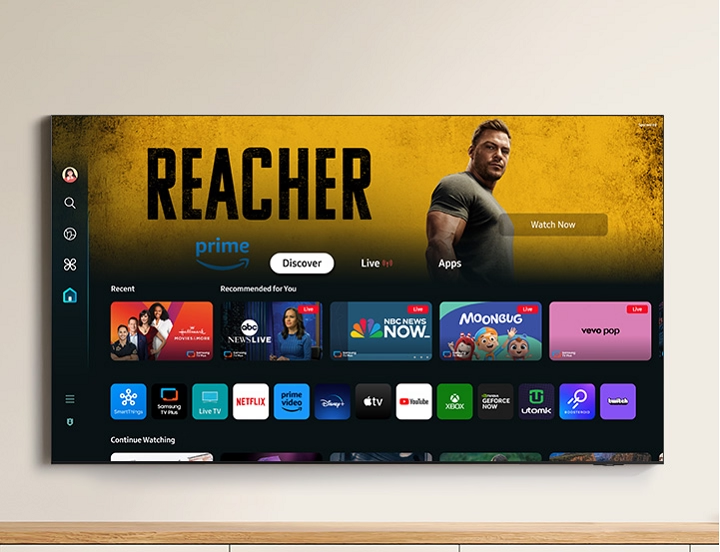
In a world filled with streaming services, smart devices, and connected home ecosystems, keeping your entertainment organized can be overwhelming. That’s where Samsung Smart Hub comes in—a powerful, intuitive platform that transforms any Samsung Smart TV into a fully integrated digital hub. More than just a way to watch TV, Smart Hub brings all your content, apps, and connected devices into one streamlined interface, making your Samsung TV the heart of your smart home.
What Is Samsung Smart Hub?
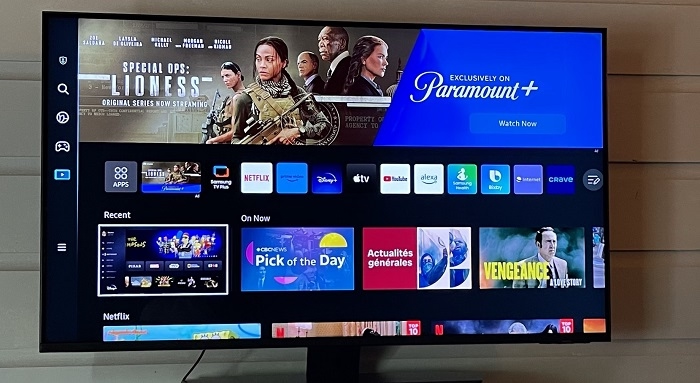
Samsung Smart Hub is the intuitive interface built into Samsung Smart TVs, offering seamless access to your favorite content, apps, live TV, and connected devices. Think of it as your TV’s operating system—designed to make your viewing experience faster, easier, and more personalized. Whether you’re switching between Netflix and YouTube, browsing the internet, or controlling your smart lights, Smart Hub keeps everything at your fingertips.
Unlike older menu systems, Smart Hub doesn’t bury options in confusing layers. Instead, it places the most used functions front and center, with a visually clean, customizable ribbon menu at the bottom of the screen. You can add or remove apps, reorder icons, and even pin favorite channels or inputs for faster access.
Seamless Access to Streaming and Apps
Smart Hub supports a wide range of apps, including all the big names like:
- Netflix
- Prime Video
- Disney+
- Hulu
- YouTube
- Apple TV
- HBO Max
- Spotify
- Samsung TV Plus
With just a few clicks, you can switch between services or resume a show where you left off. Samsung Smart Hub automatically keeps your apps up to date, and new apps can be downloaded directly from the Samsung App Store. This eliminates the need for external streaming devices or multiple remotes—everything you need is in one place.
Samsung TV Plus: Free Live TV Streaming
One of the standout features within Smart Hub is Samsung TV Plus, Samsung’s own free streaming service. It offers hundreds of live channels and on-demand content across categories like news, movies, sports, cooking, kids’ programming, and more—all at no cost.
No sign-ups, no subscriptions—just instant access to content as soon as your TV is connected to the internet. It’s a great option for cord-cutters or anyone looking for alternative viewing options without the hassle of contracts or fees.
Universal Guide: Personalized Recommendations at a Glance
With so many apps and shows available, it can be difficult to know what to watch. Samsung Smart Hub solves this with the Universal Guide, a content discovery tool that recommends TV shows, movies, and streaming content based on your viewing habits.
The Universal Guide aggregates recommendations from multiple streaming services and live TV, presenting them in a single, easy-to-browse format. You don’t have to open each individual app to see what’s new or trending—Smart Hub does the searching for you.
Voice Control and Smart Assistants
Samsung Smart TVs with Smart Hub are compatible with multiple voice assistants, including:
- Bixby (Samsung’s native assistant)
- Amazon Alexa
- Google Assistant
With voice control, you can change channels, search for shows, open apps, or even control smart home devices—all hands-free. Simply speak into the remote or a paired device, and Smart Hub responds instantly. For users with accessibility needs, voice features also provide a more inclusive and user-friendly experience.
SmartThings Integration: Control Your Smart Home
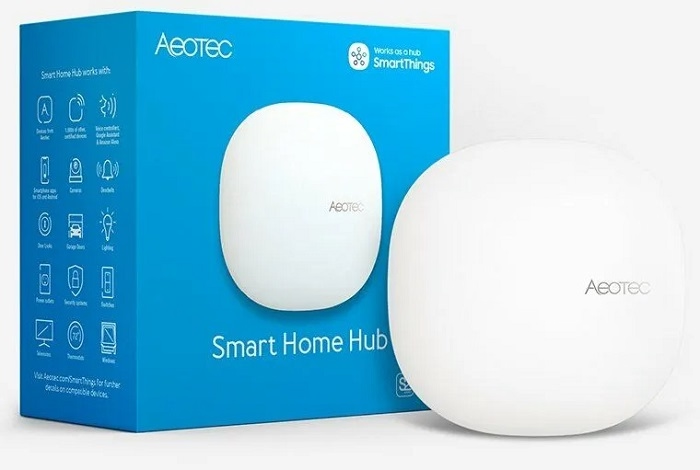
Samsung Smart Hub goes beyond entertainment—it’s also a control center for your smart home. With built-in SmartThings integration, your TV can manage compatible devices like smart lights, thermostats, cameras, doorbells, and appliances.
You can view camera feeds, check your smart fridge, or dim the lights—all from your TV screen. The SmartThings dashboard is accessible from the Smart Hub menu, offering a bird’s-eye view of your home without leaving the couch.
Web Browser and Productivity
For those who like to multitask or use their TV for more than just entertainment, Smart Hub includes a built-in web browser. You can check emails, shop online, or browse social media directly from your TV. With features like Multi View, newer Samsung Smart TVs even let you split the screen between content—perfect for watching a game while tracking fantasy stats online.
Gaming Hub: The Future of Console-Free Gaming
Select Samsung Smart TVs with Smart Hub now feature the Samsung Gaming Hub, a platform that allows users to play console-quality games via cloud streaming. Services like Xbox Cloud Gaming and NVIDIA GeForce NOW are integrated directly into the Smart Hub, meaning you don’t need a console to play high-end games—just a compatible controller and a good internet connection.
It’s a glimpse into the future of gaming, and Smart Hub puts it right at your fingertips.
Regular Updates and Future-Proofing
Samsung continually updates the Smart Hub interface with firmware improvements, new features, and security enhancements. These updates ensure that your TV remains current, secure, and compatible with the latest services and devices.
Even older Samsung Smart TVs receive updates for several years, making Smart Hub a long-term value investment—not just a short-lived novelty.
Easy Setup and Customization
Getting started with Smart Hub is simple. During the initial TV setup, you’ll be prompted to connect to Wi-Fi and sign into your Samsung account. From there, you can install apps, set up streaming accounts, and link smart devices.
You can also personalize your dashboard by rearranging app tiles, adding quick access links, or changing settings to suit your family’s viewing preferences.
Absolutely. Whether you’re a binge-watcher, casual viewer, gamer, or smart home enthusiast, Samsung Smart Hub enhances your television experience in every way. It eliminates the need for extra devices, organizes your digital life, and gives you easy access to everything you love—all on one screen.
Smart Hub isn’t just a feature—it’s the soul of your Samsung Smart TV. If you want a TV that does more than play shows, and instead acts as the digital heartbeat of your home, Samsung’s Smart Hub is exactly what you’re looking for.