


Apple’s AirTag has revolutionized how we keep track of our personal belongings. One of the most frequently asked questions by users is, “What battery does AirTag use?” This guide will provide detailed information about the battery used in AirTags, its specifications, how to replace it, and related topics to ensure you get the most out of your device.
Understanding AirTag and Its Features
What is an AirTag?
An AirTag is a small, circular tracking device developed by Apple. It helps users locate personal items such as keys, wallets, bags, and more using the Find My app on an iPhone or other Apple devices.
Key Features of AirTag
- Precision Finding: Utilizes Ultra-Wideband technology for accurate location tracking.
- Find My Network: Leverages Apple’s extensive network of devices to help locate your AirTag.
- Privacy and Security: Designed with end-to-end encryption to ensure your data is secure.
- Lost Mode: Notifies you when your AirTag is detected by another device in the Find My network.
What Battery Does AirTag Use?
Type of Battery
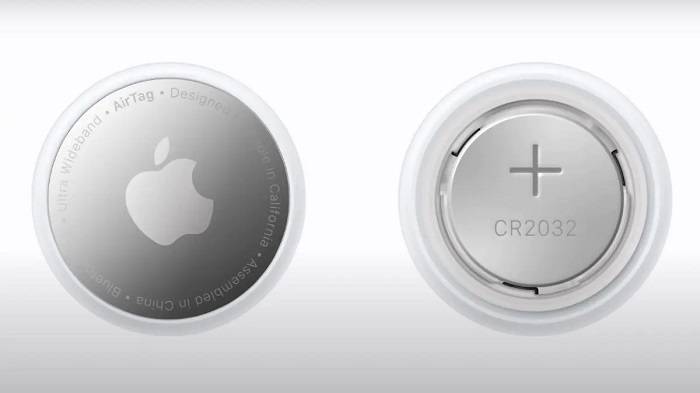
The battery used in an AirTag is a CR2032 coin cell battery. This type of battery is widely available and used in many small electronic devices due to its compact size and long-lasting power.
Specifications of CR2032 Battery
- Diameter: 20mm
- Thickness: 3.2mm
- Voltage: 3V
- Capacity: Approximately 220mAh
Why CR2032?
The CR2032 battery is chosen for its reliability, long shelf life, and consistent power output, making it ideal for the small, power-efficient AirTag.
How Long Does an AirTag Battery Last?
Battery Life Expectancy
Under normal usage conditions, the battery in an AirTag typically lasts about one year. This duration assumes regular use, including occasional use of Precision Finding and sound alerts.
Factors Affecting Battery Life
Several factors can influence how long the AirTag battery lasts, including:
- Usage Frequency: Frequent use of Precision Finding and sound alerts can drain the battery faster.
- Environmental Conditions: Extreme temperatures can affect battery performance and longevity.
- Signal Strength: Constantly searching for a signal in areas with poor connectivity can reduce battery life.
- Firmware Updates: Keeping your AirTag’s firmware updated can optimize battery usage and performance.
How to Check AirTag Battery Status
Using the Find My App
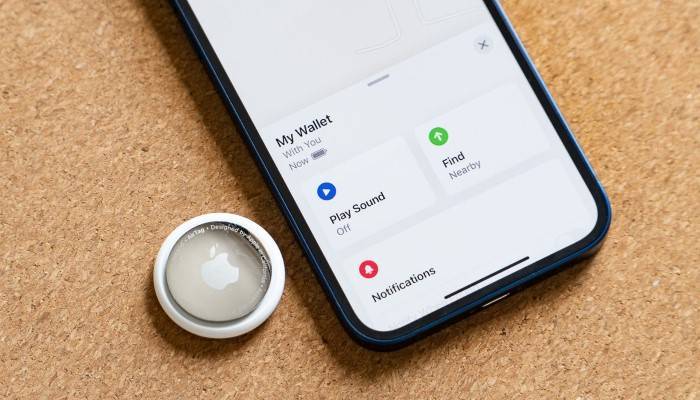
To check the battery status of your AirTag, follow these steps:
- Open the Find My App: Launch the Find My app on your iPhone.
- Select the AirTag: Tap on the AirTag you want to check.
- View Battery Status: The battery icon will show the current battery level. If the battery is low, you will see a notification prompting you to replace it.
Notifications
The Find My app will send you notifications when the battery is running low, ensuring you have ample time to replace it before it dies.
How to Replace an AirTag Battery
Step-by-Step Guide
- Prepare a New Battery: Ensure you have a new CR2032 coin cell battery ready.
- Open the AirTag: Press down on the stainless steel back cover and rotate it counterclockwise until it stops.
- Remove the Old Battery: Lift the cover and remove the old battery.
- Insert the New Battery: Place the new CR2032 battery into the AirTag with the positive side facing up.
- Reassemble the AirTag: Align the three tabs on the cover with the slots on the AirTag, press down, and rotate the cover clockwise until it stops.
Tips for Successful Battery Replacement
- Handle with Care: Avoid touching the battery terminals with your fingers to prevent corrosion.
- Check Polarity: Ensure the positive side of the battery is facing up when inserting it.
- Dispose of Old Battery Properly: Recycle the old battery at a designated battery recycling center.
Choosing the Right Battery for Your AirTag
Recommended Battery Brands
When selecting a replacement battery for your AirTag, consider reputable brands like Duracell, Energizer, and Panasonic. These brands are known for their reliability and longevity.
Battery Specifications
Ensure that the replacement battery matches the CR2032 specifications for optimal performance. Avoid off-brand batteries that may not meet these standards.
Practical Uses for AirTag
Everyday Items
Attach an AirTag to everyday items like keys, wallets, and bags to ensure they are easily found if misplaced. This is particularly useful for people who frequently lose their belongings.
Traveling
Using AirTags in your luggage or travel bags helps you monitor your belongings during your travels, providing peace of mind. You can track multiple bags with multiple AirTags, ensuring all your luggage is accounted for.
Pet Tracking
Attach an AirTag to your pet’s collar to monitor their location, especially useful for pets that tend to wander off. With multiple AirTags, you can keep track of several pets or have a backup AirTag ready.
Electronic Devices
Track valuable electronic devices like laptops, tablets, and cameras with an AirTag, helping locate them if they are lost or stolen.
Bikes and Vehicles
Attach an AirTag to your bike or vehicle to help locate them in case of theft or if they are lost in a large parking area.
Comparing AirTag with Other Tracking Devices
Tile Trackers
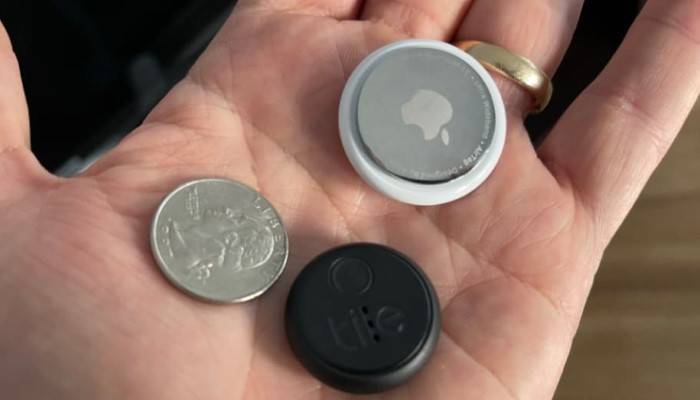
Tile trackers are a popular alternative to AirTags. They use Bluetooth technology to track items and have a similar app-based interface. However, Tile lacks the extensive Find My network and Precision Finding capabilities of AirTag.
Samsung Galaxy SmartTag
Samsung Galaxy SmartTag is specifically designed for use within the Samsung ecosystem, offering robust tracking features and integration with Samsung’s SmartThings app. It provides a seamless experience for Samsung users.
Chipolo One
Chipolo One trackers offer a comparable experience to AirTags, with Bluetooth tracking and app integration. However, they do not match the seamless integration and advanced privacy features of AirTags.
Comparison Table
| Feature | Apple AirTag | Tile Trackers | Samsung Galaxy SmartTag | Chipolo One |
| Bluetooth Tracking | Yes | Yes | Yes | Yes |
| Ultra-Wideband Technology | Yes | No | No | No |
| Find My Network | Yes | No | No | No |
| Precision Finding | Yes | No | No | No |
| Privacy and Security | End-to-End Encryption | Basic | Advanced | Basic |
| Lost Mode | Yes | Yes | Yes | Yes |
Environmental Considerations
Battery Disposal
Proper disposal of old batteries is crucial for environmental sustainability. Used CR2032 batteries should be recycled at designated battery recycling centers to prevent harmful chemicals from entering the environment.
Eco-Friendly Alternatives
While the standard CR2032 batteries are disposable, you can opt for rechargeable CR2032 batteries if they are compatible. This can help reduce waste and environmental impact.
Reducing Carbon Footprint
Using devices with replaceable batteries, such as AirTags, helps reduce electronic waste and the carbon footprint associated with manufacturing and shipping new products.
Privacy and Security Features
End-to-End Encryption
AirTags use end-to-end encryption to ensure that your location data is secure. The location data and history are never stored on the AirTag itself. Communication with the Find My network is encrypted, ensuring that only you can see where your AirTag is located.
Anti-Stalking Measures
Apple has implemented measures to prevent AirTags from being used to track individuals without their consent. If an unknown AirTag is detected moving with you, your iPhone will alert you. This feature ensures that AirTags cannot be used to track people without their knowledge.
Lost Mode
Enabling Lost Mode allows the AirTag to send notifications when detected by another device in the Find My network. You can enter contact information to help anyone who finds your AirTag to reach you.
Practical Tips for Using AirTag

Regularly Check Battery Status
Monitor the battery status of your AirTags through the Find My app and replace them promptly when needed to ensure continuous tracking.
Customize AirTag Names
Customize the names of your AirTags to reflect the items they are attached to, making it easier to manage multiple AirTags in the Find My app.
Use Protective Accessories
Consider using protective accessories such as keychain holders or waterproof cases to enhance the durability and longevity of your AirTags. These accessories provide an extra layer of protection against water and physical damage, ensuring your AirTags remain functional in various conditions.
Avoid Extreme Conditions
Avoid exposing your AirTags to extreme temperatures or harsh conditions to prevent damage and ensure they continue to function effectively. Keep them away from water and dust as much as possible to maintain their performance.
Frequently Asked Questions
What battery does AirTag use?
AirTags use a CR2032 coin cell battery, which is widely available and used in many small electronic devices.
How long does an AirTag battery last?
Under normal usage conditions, the AirTag battery typically lasts about one year. The Find My app will notify you when the battery is running low.
How do I replace the battery in my AirTag?
To replace the battery, press and rotate the back cover of the AirTag counterclockwise to remove it, replace the old battery with a new CR2032 battery, and reassemble the device.
Can I use rechargeable batteries in my AirTag?
While standard CR2032 batteries are recommended, some rechargeable CR2032 batteries may be compatible. However, their performance and longevity may vary.
How do I dispose of old AirTag batteries?
Old AirTag batteries should be recycled at designated battery recycling centers to prevent harmful chemicals from entering the environment. Many electronic stores and local recycling centers offer battery recycling services.
Related Post:
AirTag Won’t Connect: Troubleshooting and Solutions
Find AirTag: The Ultimate Guide to Locating Your Apple AirTag
AirTag Lost Mode: A Comprehensive Guide to Locating Your Items
Samsung AirTag: A Comprehensive Guide to Smart Tracking
Knowing “what battery does AirTag use” is essential for maintaining its functionality and ensuring continuous tracking of your personal items. By following the steps and tips provided in this guide, you can easily replace the battery and keep your AirTag working effectively. Proper maintenance and environmentally conscious disposal practices will help you get the most out of your AirTag while minimizing environmental impact. Whether you use AirTags for everyday items, travel, or pet tracking, this guide provides all the information you need to manage the battery for AirTag effectively.