

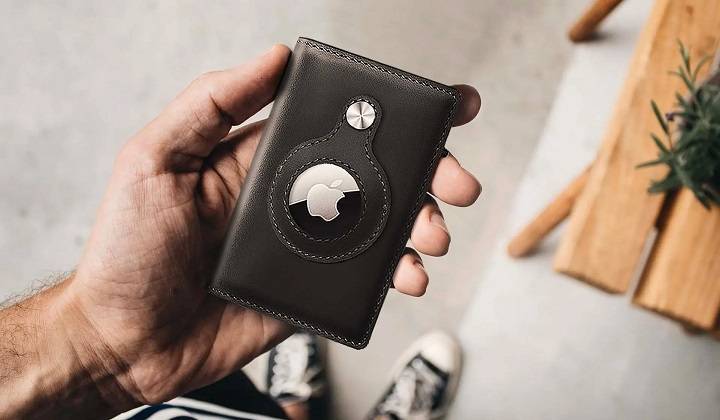
Losing your wallet can be a stressful experience, but Apple’s AirTag provides an innovative solution to help you keep track of it. In this comprehensive guide, we will explore how to use an AirTag for wallet tracking, discuss related topics, and provide detailed information on enhancing the security of your belongings.
Understanding AirTag for Wallet
What is an AirTag?
An AirTag is a small, coin-shaped tracking device developed by Apple. It uses Bluetooth technology to communicate with nearby Apple devices, helping you locate your belongings using the Find My app on your iPhone, iPad, or Mac.
Key Features
- Precision Finding: Uses Ultra-Wideband technology to locate your items precisely.
- Find My Network: Leverages Apple’s vast network of devices to help you find lost items.
- Replaceable Battery: Powered by a CR2032 coin cell battery with a lifespan of about one year.
- Water and Dust Resistance: Rated IP67, making it resistant to water and dust.
- Privacy and Security: Features end-to-end encryption to ensure your location data is secure.
How to Use AirTag for Wallet
Step-by-Step Guide
- Purchase an AirTag and Holder: Buy an AirTag and a suitable holder designed for wallets.
- Activate the AirTag: Remove the tab to activate the AirTag’s battery.
- Set Up the AirTag: Bring the AirTag close to your iPhone. A setup prompt will appear. Follow the on-screen instructions to connect the AirTag to your Apple ID.
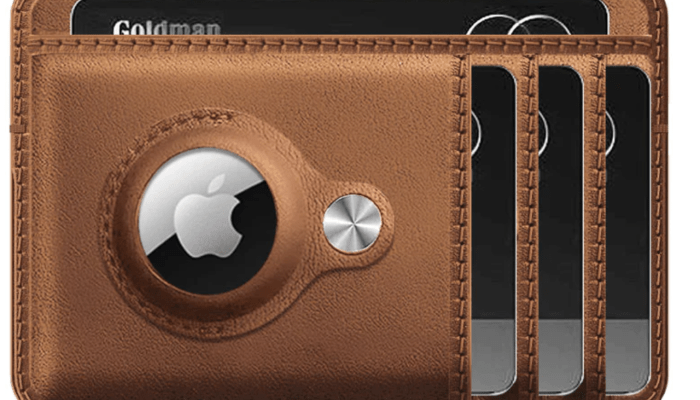
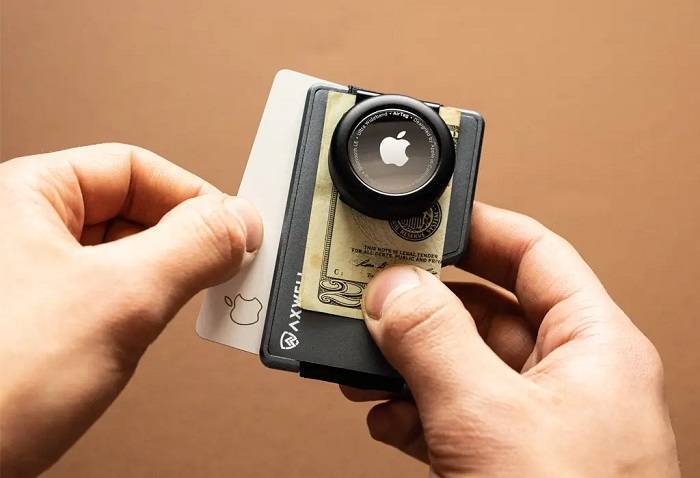
- Insert the AirTag into the Wallet Holder: Place the AirTag into a holder that fits securely in your wallet.
- Place in Wallet: Insert the holder with the AirTag into your wallet.
Choosing the Right Holder
- Size and Fit: Ensure the holder fits well in your wallet without adding bulk.
- Material: Choose a durable material that will protect the AirTag from damage.
- Design: Select a design that securely holds the AirTag in place.
Benefits of Using AirTag for Wallet
Enhanced Security
Using an AirTag for your wallet provides an added layer of security. If your wallet is misplaced or stolen, you can quickly locate it using the Find My app.
Peace of Mind
Knowing you have a reliable tracking device in your wallet can give you peace of mind, reducing anxiety about losing your valuable items.
Cost-Effective Solution
Compared to other tracking devices, the AirTag is relatively affordable and integrates seamlessly with Apple’s ecosystem.
Practical Uses of AirTag for Wallet
Everyday Use
Attach an AirTag to your wallet for everyday use, ensuring you can always find it if misplaced.
Traveling
Using an AirTag while traveling can help you keep track of your wallet, especially in busy or unfamiliar places.
Gifting
An AirTag makes a thoughtful gift for friends and family members who often misplace their wallets.
Enhancing AirTag Usage
Regularly Check Battery Status
Monitor the battery status of your AirTag through the Find My app and replace it promptly when needed to ensure continuous tracking.
Customize AirTag Names
Customize the name of your AirTag in the Find My app to reflect the item it is attached to, making it easier to manage multiple AirTags.
Use with Other Tracking Methods
For enhanced security, consider using the AirTag alongside other tracking methods, such as RFID-blocking wallets or traditional ID tags.
Comparing AirTag with Other Wallet Trackers
Tile Slim
Tile Slim is a popular alternative to AirTag for wallet tracking. It offers a similar Bluetooth tracking feature but lacks the extensive Find My network.
Chipolo Card
Chipolo Card is another wallet tracker option. It is designed to fit in wallets and offers Bluetooth tracking, but it doesn’t integrate as seamlessly with Apple devices as AirTag.
Comparison Table
| Feature | Apple AirTag | Tile Slim | Chipolo Card |
| Bluetooth Tracking | Yes | Yes | Yes |
| Ultra-Wideband Technology | Yes | No | No |
| Find My Network | Yes | No | No |
| Battery Life | 1 year | 3 years | 1 year |
| Size and Fit | Compact | Slim | Slim |
AirTag Privacy and Security

Data Encryption
AirTags use end-to-end encryption to ensure that your location data is secure. The location data and history are never stored on the AirTag itself, ensuring that only you can see where your AirTag is located.
Anti-Stalking Measures
Apple has implemented measures to prevent AirTags from being used to track individuals without their consent. If an unknown AirTag is detected moving with you, your iPhone will alert you. This feature ensures that AirTags cannot be used to track people without their knowledge.
Related Topics
Integrating AirTag with Apple Ecosystem
Using AirTag within the Apple ecosystem enhances its functionality. You can use it with your iPhone, iPad, Apple Watch, and Mac for seamless tracking and notifications.
Maintaining Your AirTag
Regular maintenance of your AirTag, including checking and replacing the battery, ensures it remains functional and reliable.
Enhancing Wallet Security
- RFID-Blocking Wallets: Protect your cards from electronic theft by using RFID-blocking wallets.
- Traditional ID Tags: Use traditional ID tags alongside your AirTag for added security.
- Secure Wallet Holders: Invest in a secure holder that keeps your AirTag and wallet safe.
Using AirTag for Other Items
AirTags are versatile and can be used to track various items, including keys, bags, luggage, and pets. Understanding how to optimize AirTag use for different items can help you keep track of all your belongings.
AirTag Accessories
There are numerous accessories available to enhance the use and protection of your AirTag, including protective cases, keychains, and adhesive mounts.
Common AirTag Issues and Fixes
- AirTag Not Connecting: Detailed steps to troubleshoot and resolve connection issues.
- AirTag Not Updating Location: Solutions to ensure your AirTag updates its location accurately in the Find My app.
- AirTag Not Detected by Nearby Devices: Steps to resolve issues when the AirTag is not detected by other devices in the Find My network.
AirTag and Traveling
Using AirTag while traveling provides peace of mind. Attach it to your luggage, backpack, or travel documents to keep track of your belongings during trips.
Frequently Asked Questions
How do I set up an AirTag for my wallet?
Activate the AirTag, set it up using your iPhone, place it in a suitable holder, and insert the holder into your wallet.
How do I check the battery status of my AirTag?
Open the Find My app, select your AirTag, and the battery status will be displayed on the screen.
Can multiple people track the same AirTag?
No, an AirTag can only be associated with one Apple ID at a time. Only the person who set up the AirTag can track it.
How often do I need to replace the AirTag battery?
The AirTag battery typically lasts about one year. The Find My app will notify you when the battery is running low, giving you ample time to replace it.
What should I do if my AirTag is not working?
Ensure Bluetooth is enabled, restart your iPhone, update to the latest iOS version, and reset the AirTag by removing and reinserting the battery.
Related Post:
How to Reset an AirTag: A Comprehensive Guide
How to Set Up AirTag: A Comprehensive Guide
Does AirTag Work with Android? A Comprehensive Guide
How to Check AirTag Battery: A Comprehensive Guide
Using an AirTag for wallet tracking is a smart and efficient way to keep your valuable items secure. This guide has covered the setup process, benefits, practical uses, and comparisons with other wallet trackers. By following the tips and information provided, you can maximize the functionality of your AirTag and ensure your wallet is always within reach.