

In today’s fast-paced world, staying connected to your belongings is more important than ever. With the rise of smart tracking devices like the Airtag, keeping tabs on your valuables has never been easier. However, to ensure uninterrupted tracking, it’s essential to know how to change your Airtag battery when the time comes. In this guide, we’ll walk you through the process of changing your Airtag battery step-by-step, as well as provide valuable insights into maximizing your Airtag’s performance.
Understanding Airtag Battery Life

What is an Airtag Battery?
An Airtag battery is a small, coin-shaped battery that powers your Airtag device. It provides the necessary power for the Airtag to communicate with your smartphone or other compatible devices via Bluetooth.
How Long Does an Airtag Battery Last?
The battery life of an Airtag can vary depending on usage and environmental factors. On average, an Airtag battery can last up to one year before needing replacement.
Signs That Your Airtag Battery Needs Changing
Decreased Tracking Accuracy
If you notice that your Airtag is no longer providing accurate location information or is taking longer to update its location, it may be a sign that the battery is running low.
Intermittent Connectivity
Another indication that your Airtag battery may need changing is if you experience intermittent connectivity issues between your Airtag and your smartphone or other compatible devices.
Changing Your Airtag Battery: Step-by-Step Guide
Gather Your Supplies
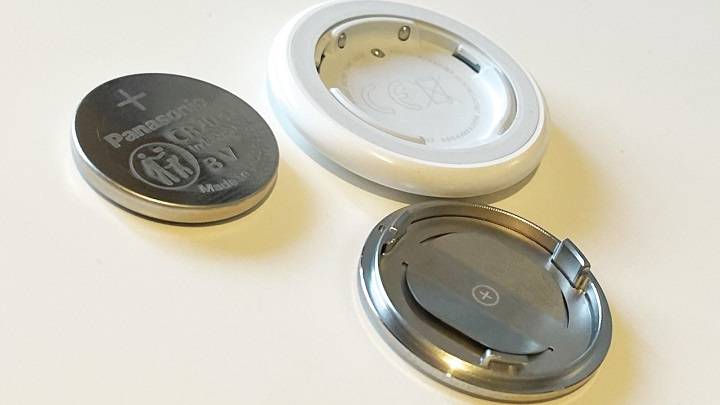
Before you begin, make sure you have a replacement battery on hand. Airtags typically use CR2032 batteries, which are widely available at most electronics stores.
Locate the Battery Compartment
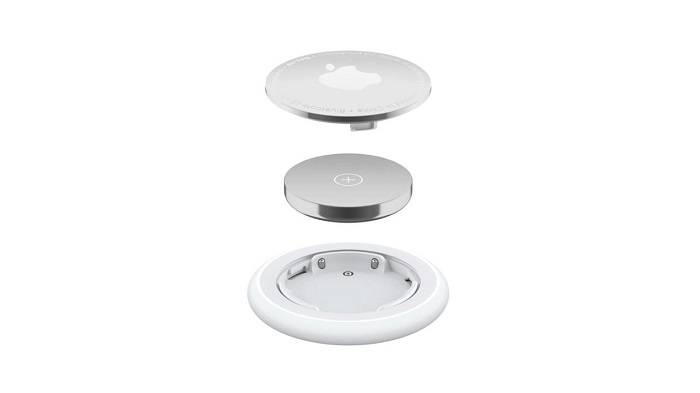
Turn your Airtag over to locate the battery compartment. It is usually located on the back of the device and can be accessed by twisting the battery cover counter-clockwise.
Remove the Old Battery
Carefully remove the old battery from the battery compartment using your fingers or a small tool, such as a flat-head screwdriver. Be sure to dispose of the old battery properly.
Insert the New Battery
Insert the new CR2032 battery into the battery compartment, ensuring that the positive (+) side is facing up. Press down gently to secure the battery in place.
Replace the Battery Cover
Once the new battery is installed, replace the battery cover by twisting it clockwise until it locks into place. Ensure that the cover is securely fastened to prevent water or dust from entering the battery compartment.
Test Your Airtag
Turn your Airtag over and press the button to test that the new battery is working properly. If the Airtag powers on and connects to your device without any issues, the battery replacement was successful.
Tips for Maintaining Your Airtag Battery
Avoid Extreme Temperatures
To prolong the life of your Airtag battery, avoid exposing it to extreme temperatures, as both high heat and cold can degrade battery performance.
Regularly Check Battery Status
Get into the habit of checking your Airtag’s battery status regularly through the Airtag app. This will allow you to monitor battery life and plan for replacements accordingly.
Frequently Asked Questions (FAQs)
How often should I replace my Airtag battery?
It’s recommended to replace your Airtag battery approximately once a year to ensure optimal performance.
Can I use rechargeable batteries in my Airtag?
No, Airtags are designed to be used with non-rechargeable CR2032 batteries. Using rechargeable batteries may cause damage to your device.
Do I need any special tools to replace my Airtag battery?
No, replacing your Airtag battery requires no special tools. You can easily remove and replace the battery using your fingers or a small tool.
Will replacing the battery void my Airtag’s warranty?
No, replacing the battery in your Airtag will not void its warranty. However, be sure to follow the manufacturer’s guidelines to ensure proper installation.
Can I recycle my old Airtag batteries?
Yes, most electronics stores offer battery recycling programs where you can dispose of your old Airtag batteries responsibly.
Related Post:
A Comprehensive Comparison: AirTag vs. Tile
The Ultimate Guide to AirTag Cases: Everything You Need to Know
Unlocking Airtag Android Compatibility: Everything You Need to Know
Changing your Airtag battery is a simple yet essential task that ensures your device continues to perform at its best. By following the steps outlined in this guide and implementing our maintenance tips, you can keep your Airtag running smoothly and enjoy peace of mind knowing your belongings are always within reach.