


Are you wondering how to replace Airtag battery? Look no further! In this comprehensive guide, we’ll walk you through everything you need to know about replacing the battery in your Airtag. From understanding the battery type to step-by-step instructions and helpful tips, you’ll become a pro at Airtag battery replacement in no time. Let’s dive into the world of Airtag battery replacement together and ensure your tracking device is always powered up and ready to go!
Understanding Airtag Battery Replacement
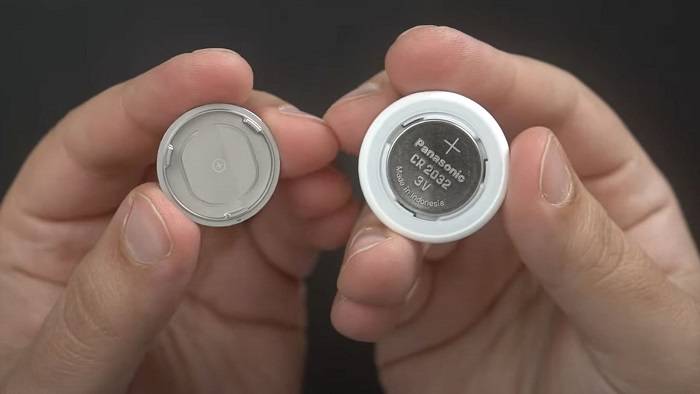
Before diving into the process of replacing the battery in your Airtag, it’s essential to understand the basics of Airtag battery replacement. Let’s explore some key topics related to Airtag battery replacement:
- Introduction to Airtag Battery: Learn about the battery type used in Airtags and how it impacts the replacement process.
- Signs of Low Battery: Discover the signs that indicate your Airtag battery is running low and needs replacement.
- Frequency of Replacement: Understand how often you should replace the battery in your Airtag to ensure optimal performance.
- Tools and Materials: Familiarize yourself with the tools and materials needed for Airtag battery replacement, including the type of battery required and any additional tools or accessories.
- Safety Precautions: Learn important safety precautions to follow when replacing the battery in your Airtag to prevent damage and ensure your safety.
Airtag Battery
Airtags are equipped with a CR2032 lithium coin cell battery, which provides long-lasting power for tracking purposes. The battery is located inside the Airtag casing and is easily accessible for replacement when needed. Understanding the type of battery used in Airtags is essential for successful battery replacement.
Signs of Low Battery
Knowing the signs of a low battery in your Airtag can help you identify when it’s time for replacement. Some common signs of a low Airtag battery include:
- Reduced Tracking Range: If your Airtag’s tracking range has significantly decreased, it could be a sign that the battery is running low and needs replacement.
- Intermittent Connectivity: You may experience intermittent connectivity issues with your Airtag, such as difficulty pairing with your device or frequent disconnections, indicating a low battery.
- Low Battery Warning: Airtags are equipped with a low battery warning feature that alerts you when the battery is running low. If you receive a low battery notification, it’s time to replace the battery.
Frequency of Replacement
The frequency of Airtag battery replacement depends on factors such as usage patterns and environmental conditions. In general, you can expect the battery in your Airtag to last approximately one year with typical usage. However, heavy usage or extreme temperatures may shorten the battery life, necessitating more frequent replacement.
Tools and Materials
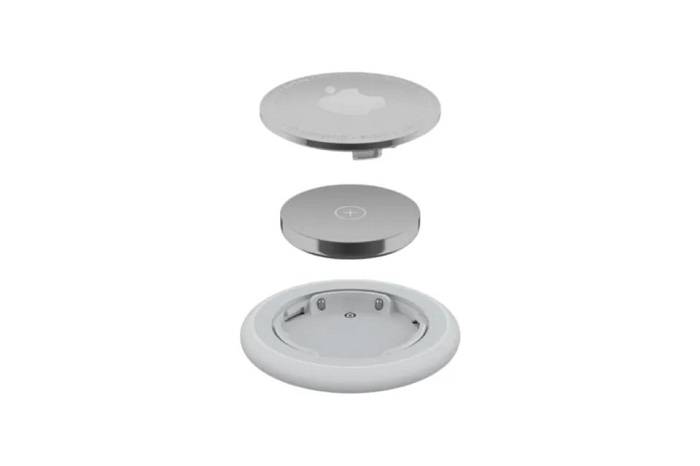
To replace the battery in your Airtag, you’ll need the following tools and materials:
- CR2032 Lithium Coin Cell Battery: This is the type of battery used in Airtags and can be purchased from most electronics stores or online retailers.
- Small Phillips Head Screwdriver: A small Phillips head screwdriver is needed to open the Airtag casing and access the battery compartment.
- Clean Cloth: A clean cloth can be used to handle the Airtag and battery to prevent contamination and ensure a clean installation.
- Optional: Tweezers or Plastic Pry Tool: Tweezers or a plastic pry tool may be helpful for removing the old battery from the Airtag casing, although they are not required.
Safety Precautions
When replacing the battery in your Airtag, it’s essential to follow these safety precautions to prevent damage and ensure your safety:
- Power Off Airtag: Before beginning the battery replacement process, power off your Airtag to prevent any accidental activation or damage.
- Handle with Care: Handle the Airtag and battery with care to avoid damaging delicate components or causing injury.
- Avoid Water Exposure: Keep your Airtag and battery away from water or moisture to prevent damage to the electronic components.
- Dispose of Old Battery Properly: Dispose of the old battery properly according to local regulations for electronic waste recycling.
Step-by-Step Guide to Airtag Battery Replacement
Now that you’re familiar with the basics of Airtag battery replacement, let’s walk through the step-by-step process:
- Power Off Airtag: Ensure your Airtag is powered off to prevent any accidental activation during the battery replacement process.
- Remove Airtag Cover: Use a small Phillips head screwdriver to remove the screws securing the Airtag cover in place.
- Access Battery Compartment: Once the cover is removed, locate the battery compartment inside the Airtag casing.
- Remove Old Battery: Carefully remove the old battery from the battery compartment using tweezers or a plastic pry tool if necessary.
- Insert New Battery: Insert the new CR2032 lithium coin cell battery into the battery compartment, ensuring it is positioned correctly with the positive(+) and negative(-) terminals aligned.
- Replace Airtag Cover: Replace the Airtag cover and secure it in place with the screws removed earlier.
- Power On Airtag: Power on your Airtag and test it to ensure the new battery is functioning correctly.
Frequently Asked Questions
How often should I replace the battery in my Airtag?
The battery in your Airtag should be replaced approximately every year or when you receive a low battery notification.
Can I use rechargeable batteries in my Airtag?
No, Airtags are designed to be used with non-rechargeable CR2032 lithium coin cell batteries. Rechargeable batteries are not recommended and may cause damage to your Airtag.
Can I replace the battery in my Airtag myself?
Yes, you can replace the battery in your Airtag yourself using a small Phillips head screwdriver and a new CR2032 lithium coin cell battery.
How do I dispose of the old battery from my Airtag?
Dispose of the old battery properly according to local regulations for electronic waste recycling. Do not dispose of batteries in the trash or household recycling bins.
Will replacing the battery in my Airtag void the warranty?
No, replacing the battery in your Airtag will not void the warranty as long as it is done correctly following the manufacturer’s guidelines.
Related Post:
Unlocking the Secrets: Understanding SeriennummerAirpods
Unveiling the Powerhouse: iPhone 15 Pro Max Specs Revealed
Unleash Your Creativity: Mastering iPhone Text Effects
Knowing how to replace the battery in your Airtag is essential for maintaining optimal performance and ensuring your tracking device is always powered up and ready to go. By understanding the signs of a low battery, the tools and materials needed for replacement, and following safety precautions, you can confidently replace the battery in your Airtag yourself. If you have any questions or concerns about Airtag battery replacement, refer to the FAQs or consult the manufacturer’s guidelines for assistance. With proper care and maintenance, your Airtag will continue to provide reliable tracking for years to come!