


Embarking on your Airtag journey? In this comprehensive guide, we’ll walk you through the process of setting up Airtags from start to finish. Whether you’re a seasoned tech enthusiast or new to the world of Airtags, this guide has you covered. With detailed instructions, expert tips, and troubleshooting advice, you’ll be setting up your Airtags like a pro in no time. Let’s dive in and unlock the full potential of your Airtag tracking experience!
Understanding Airtag Setup Basics

Get acquainted with the basics of Airtag setup and the essential components you’ll need to get started:
- Introduction to Airtags: Learn about the features and capabilities of Airtags, including precision tracking, integration with the Find My app, and compatibility with Apple devices.
- Required Equipment: Identify the equipment needed to set up Airtags, including an iPhone or iPad running iOS 14.5 or later and access to the Find My app.
Preparing Your Airtag for Setup
Before diving into the setup process, ensure your Airtag is ready to be paired with your Apple device:
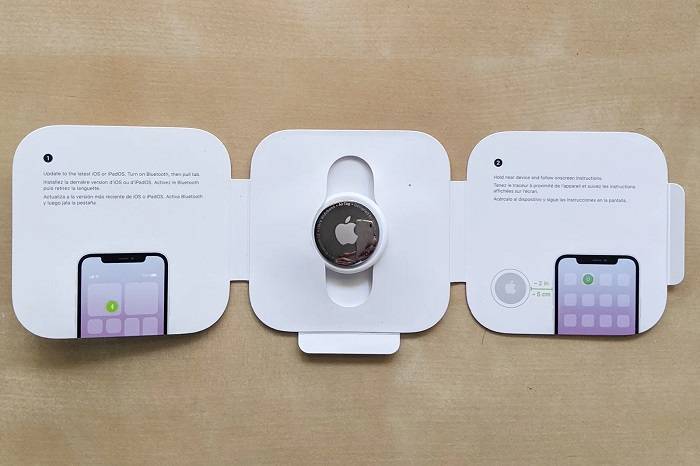
- Activating Your Airtag: Follow the instructions for activating your Airtag by removing the protective plastic tab and placing it near your iPhone or iPad.
- Checking Battery Level: Verify the battery level of your Airtag to ensure it has sufficient power for the setup process and tracking functionality.
Step-by-Step Guide: How to Set Up Airtag
Follow these step-by-step instructions to set up your Airtag and begin tracking your belongings with ease:
- Opening the Find My App: Launch the Find My app on your iPhone or iPad and navigate to the “Items” tab to begin the setup process.
- Adding a New Item: Tap the “Add New Item” button in the Find My app and select “Airtag” from the list of available devices.
- Pairing Your Airtag: Hold your Airtag near your device and follow the on-screen instructions to pair it with your iPhone or iPad.
- Naming Your Airtag: Assign a name to your Airtag to easily identify it within the Find My app and distinguish it from other tracked items.
- Completing Setup: Once the setup process is complete, your Airtag will be ready for use, and you can begin tracking your belongings immediately.
Customizing Airtag Settings
Explore advanced settings and customization options to tailor your Airtag experience to your preferences:
- Customizing Notifications: Adjust notification settings to receive alerts when your Airtag is detected or moves outside a specified range.
- Enabling Precision Finding: Activate Precision Finding to leverage Ultra Wideband technology for precise location tracking within inches.
Integrating Airtags with Find My Network
Learn how Airtags leverage the Find My network to enhance tracking capabilities and locate lost items:
- Utilizing Crowdsourced Tracking: Explore how the Find My network uses the collective power of millions of Apple devices to locate lost Airtags, even when out of Bluetooth range.
- Activating Lost Mode: Learn how to activate Lost Mode for your Airtag to receive notifications when it’s detected by another Apple device and enable personalized messages for the finder.
Frequently Asked Questions
Can I use Airtags with Android devices?
No, Airtags are designed for seamless integration with Apple devices running iOS 14.5 or later and require an iCloud account for tracking functionality.
How many Airtags can I set up with my iPhone or iPad?
You can set up and track up to 16 Airtags simultaneously using the Find My app on your iPhone or iPad.
Can I share Airtags with family members or friends?
Yes, you can share Airtags with family members or friends using the Family Sharing feature in the Find My app, allowing multiple users to track the same Airtag.
What should I do if I encounter issues during Airtag setup?
If you encounter any issues during Airtag setup, ensure that your device is running the latest version of iOS and try resetting your Airtag before attempting setup again.
Can I use Airtags to track pets or children?
Airtags are designed for tracking inanimate objects and should not be used to track pets or children without their consent.
Related Post:
Unleash Your Creativity: Mastering iPhone Text Effects
Exploring the Possibility: Can You Run with AirPods Max?
Unlocking the Mystery: How Long Do AirPods Max Take to Charge?
Mastering Airtag setup is essential for unlocking the full potential of your tracking experience and ensuring seamless integration with your Apple devices. By following the step-by-step guide provided in this article and exploring the advanced settings and customization options available, you can personalize your Airtag experience to suit your needs and preferences. If you have any further questions about Airtag setup or encounter any challenges along the way, refer to the FAQs or reach out to Apple Support for assistance. With the right knowledge and guidance, you’ll be setting up your Airtags like a pro and enjoying reliable tracking functionality in no time!