

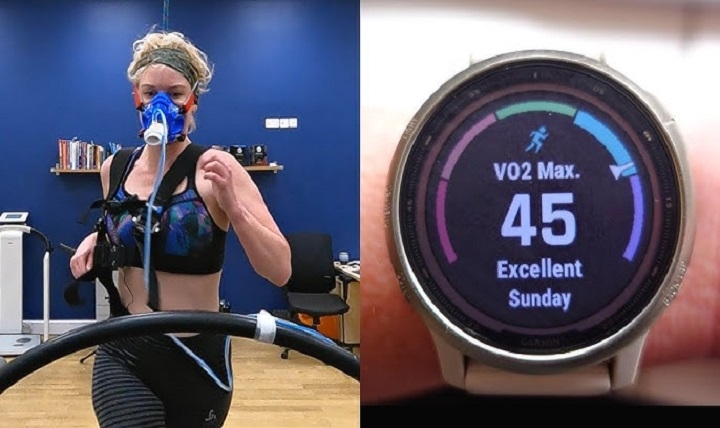
Apple Watch is more than just a smartwatch—it’s a powerful fitness companion. One of its standout features is tracking VO2 max, a key indicator of cardiovascular fitness. But many users wonder: How accurate is VO2 max on Apple Watch? Does it match up to lab tests or professional-grade fitness trackers?
In this guide, we’ll dive deep into VO2 max Apple Watch accuracy, how it works, what affects it, how it compares to medical-grade methods, and how to improve your readings.
What Is VO2 Max and Why Does It Matter?
VO2 max refers to the maximum amount of oxygen your body can use during intense exercise. It’s measured in milliliters of oxygen per kilogram of body weight per minute (ml/kg/min). The higher your VO2 max, the better your aerobic fitness and endurance.
It’s often used by:
- Runners and cyclists
- Professional athletes
- Doctors monitoring heart health
- Everyday fitness users tracking progress
VO2 max is a reliable measure of cardiovascular performance and an indicator of how efficiently your body uses oxygen during physical activity.
How Does Apple Watch Measure VO2 Max?
Apple Watch Series 3 and later measure VO2 max using a submaximal estimation method. This means it doesn’t require you to run to complete exhaustion (like in a lab). Instead, it uses motion and heart rate data during moderate outdoor workouts like walking, running, or hiking.
Here’s how it works:
- Uses the heart rate sensor to monitor beats per minute
- Combines this with GPS data (speed, distance, elevation)
- Applies Apple’s custom algorithm to estimate your VO2 max
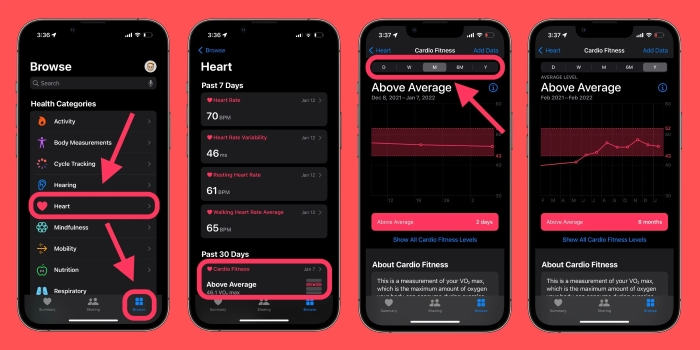
The estimate appears in the Health app under Cardio Fitness.
How Accurate Is Apple Watch VO2 Max?
Apple states that its VO2 max estimates are within a 5-10% margin of error compared to clinical treadmill testing. However, this accuracy depends on several key factors:
| Factor | Impact on Accuracy |
| Workout Type | Only accurate during outdoor walking or running |
| Heart Rate Sensor Quality | Best with snug fit and clean sensors |
| GPS Signal Strength | Strong signal improves pace and distance accuracy |
| User Profile Settings | Age, weight, height must be entered correctly |
| Consistency of Training | More data = more refined estimation |
Comparison to Lab Testing
| Method | Accuracy | Notes |
| Apple Watch (outdoor) | Moderate | Best when walking/running outdoors |
| Treadmill VO2 test | High | Gold standard, uses oxygen masks |
| Garmin/Suunto | Similar | Uses similar algorithms with chest straps |
Apple Watch VO2 max is not a medical-grade test, but it’s useful for tracking trends over time and measuring general fitness improvements.
Common Issues That Affect VO2 Max Readings
If your Apple Watch is showing inconsistent or low VO2 max values, these may be the causes:
Not Doing Eligible Workouts
Only brisk outdoor walks or runs trigger VO2 max calculations. Indoor workouts, biking, or strength training don’t count.
Poor GPS or Heart Rate Readings
A weak GPS signal or loose watch band may result in poor data quality. Always make sure your watch is snug, and workouts are outdoors.
Incorrect Profile Information
Make sure your age, gender, height, and weight are updated in the Health app. This data directly affects VO2 max estimation.
Irregular Workout Patterns
Apple Watch needs multiple data points over time. Sporadic workouts may result in missing or unreliable VO2 max values.
How to Improve VO2 Max Accuracy on Apple Watch
To get more precise and consistent VO2 max readings, follow these tips:
- Use Outdoor Workouts: Stick to outdoor walking or running with good GPS.
- Wear Your Watch Properly: Ensure the back of the watch is snug against your wrist.
- Enable Fitness Tracking: Go to Settings > Privacy > Motion & Fitness and turn on Fitness Tracking and Heart Rate.
- Update Health Data: Verify your profile information in the Health app > Profile.
- Avoid Manual Pauses: Let the watch track workouts naturally for more consistent heart rate and motion data.
How Often Does Apple Watch Measure VO2 Max?
Apple Watch typically measures VO2 max during eligible workouts lasting at least 20 minutes. You can view your VO2 max under:
- Health App > Browse > Heart > VO2 Max
- View daily, weekly, or monthly averages
- You’ll also see Cardio Fitness Level categorized as low, above average, or high for your age and gender
Who Should Use Apple Watch VO2 Max Data?
Anyone interested in their heart health and endurance performance can benefit from VO2 max tracking. It’s especially useful for:
- Runners monitoring endurance gains
- People recovering from cardiovascular conditions (non-clinical)
- Individuals improving their general fitness
- Users who want a simple, accessible metric of aerobic fitness
How to Manually Add or View VO2 Max in Health App
Although you can’t manually enter VO2 max, you can view trends:
- Open Health app
- Tap Browse > Heart
- Tap VO2 Max
- Check your recorded workouts, dates, and values
If data isn’t showing, it likely means your workouts weren’t eligible or tracked with enough accuracy.
FAQs
How accurate is VO2 max on Apple Watch?
VO2 max on Apple Watch is accurate within 5-10% compared to lab tests when using outdoor walking or running. It’s an estimation, not a clinical reading.
Why is my VO2 max not updating on Apple Watch?
Ensure you’re doing eligible outdoor workouts, your watch is worn snugly, and profile info is correct in the Health app.
Can I get VO2 max from indoor workouts?
No. Apple Watch only estimates VO2 max from outdoor walks, hikes, or runs using GPS and heart rate data.
Does VO2 max increase with regular exercise?
Yes. As your aerobic fitness improves, your VO2 max typically increases. Apple Watch helps you monitor this trend over time.
Can I use VO2 max for training goals?
Absolutely. Many athletes use VO2 max as a marker of endurance. While Apple Watch may not give exact values, it’s great for tracking general progress.